The wrong banner size is invisible damage. Blurry images, cropped logos, rejected ads, and potential customers who scroll past without a second glance. Getting dimensions right isn’t a technicality; it’s the difference between a brand that looks polished and one that looks amateurish.
- 91% of people prefer visual content over text-only content
- 80%+ of consumer internet traffic is now video
- A jump from 1 to 3 seconds in page load time increases bounce rate by 32%, and an oversized hero banner is one of the most common causes
This guide covers every major platform and placement type: social media, websites, e-commerce, email, and paid advertising. Sizes are verified and current as of June 2026, including Instagram’s major January 2026 grid format change.
Why Banner Size Matters (And What You Need to Know First)
Every social platform, ad network, and website theme has its own size requirements. Upload the wrong size and the platform either auto-crops it (cutting off your logo or CTA), compresses it badly (destroying image quality), or rejects it outright.
Key Terms Explained
Pixels (px): The unit of measurement for digital images. When you see “1080×1920px”, that means 1080 pixels wide and 1920 pixels tall.
Aspect ratio: The proportional relationship between width and height. A 1:1 ratio is square. A 16:9 ratio is standard widescreen. A 9:16 ratio is the full vertical format used for Stories and Reels.
Safe zone: The center 80% of any banner, guaranteed to be visible on all screen sizes and devices. Always keep your logo, key headline, and CTA button inside this area.
Resolution vs. File Size: Resolution (pixels) determines sharpness. File size (KB/MB) determines load speed. Both matter; a 1920×1080px image that is 4 MB will slow your site and hurt SEO. Target under 200 KB for web backgrounds after compression.
Retina / 2x Display Tip: On retina screens, standard-resolution images look blurry. Design at 2x the intended display size, then export at the final 1x size. For example, for a 300×250px ad, design at 600×500px then export at 300×250px.
Social Media Banner Sizes (2026)
Social media is where most designers spend 80% of their banner-sizing time. Every platform has different rules, and some changed significantly in 2026.
Facebook Banner Sizes
- Cover Photo (Desktop) 820×312
- Cover Photo (Mobile) 640×360
- Profile Picture 170×170
- Feed Image 1200×630
- Story / Reel 1080×1920
- Ad Image 1200×628
Facebook cover photos appear differently on desktop (820×312px) and mobile (640×360px). When designing, use 820×462px and keep key content in the center to accommodate both. Ads use a 1.91:1 ratio for link preview images, this is the standard Open Graph format used across the web.
Instagram Banner Sizes Updated Jan 2026
- Feed Post (Portrait) 1080×1350
- Story / Reel 1080×1920
- Square Post 1080×1080
- Profile Picture 320×320
- Carousel Slide 1080×1080
Instagram Grid Changed in January 2026
Instagram switched its profile grid from square (1:1) to a taller 3:4 portrait format in January 2026. Square posts still upload but display cropped on the profile grid. Design new feed posts at 4:5 portrait (1080×1350px). This format also earns more organic reach because it takes up more screen real estate.
LinkedIn Banner Sizes
- Personal Background 1584×396
- Company Page Banner 1128×191
- Profile Picture 400×400
- Post Image 1200×627
LinkedIn’s personal background banner uses a 4:1 aspect ratio. Note that the company page banner is significantly narrower (1128×191px), a common mistake is designing the personal and company banners at the same size. LinkedIn cover photos are also cropped differently on desktop vs. mobile, so keep key content centered and away from edges.
YouTube Banner Sizes
- Channel Art (Full) 2560×1440
- Safe Zone (All Devices) 1235×338
- Thumbnail 1280×720
- Max File Size 6 MB
YouTube channel art is a unique challenge: you design at 2560×1440px, but YouTube automatically crops it depending on screen size. Text and logos are cut off at 1235×338px, this is the only area guaranteed to show on all devices. Keep your channel name, logo, and upload schedule inside that center area. Everything outside it may be invisible on smaller screens.
X (Twitter) Banner Sizes
- Header / Banner 1500×500
- Profile Photo 400×400
- Card / Link Preview 1200×628
- Single-Image Ad 1200×628
TikTok, Pinterest & Snapchat
- Video / Profile Banner 1080×1920
- Profile Photo 200×200
- Standard Pin 1000×1500
- Square Pin 1000×1000
- Profile Photo 165×165
Universal Rule for All Social Platforms
Design feed posts at 1080×1350px (4:5 portrait) and all vertical video at 1080×1920px (9:16). These two sizes work across Instagram, TikTok, Facebook Reels, YouTube Shorts, and Snapchat Stories. 1080px wide is the universal baseline for 2026.
Website Banner Sizes
Website banners need to look sharp across a range of screen widths, from mobile (375px) to ultrawide desktop (2560px+). Here are the key sizes for every placement.
Hero / Full-Width Banner
Recommended size: 1280×720px (16:9) minimum, up to 1920×1080px for full-screen backgrounds. Keep file size under 200 KB using compression; hero images are one of the top causes of slow page load, which directly hurts SEO and bounce rate. Keep text and CTAs centered at 70–80% to prevent cropping on narrow screens.
Shopify & E-Commerce Banners
Recommended Shopify hero banner: 2048×1024px. Other popular sizes: 1600×500px and 2500×900px, depending on the theme. Target file size under 500 KB. Place key text in the center 80% to prevent mobile cropping. The wide-and-short format (3:1 to 5:1 ratio) is most common in e-commerce themes.
Blog & Article Header Images
Standard size: 1200×630px. This works both as an in-article header and as the Open Graph preview image when someone shares your post on Facebook, LinkedIn, or X, one design, two placements.
Sidebar & In-Content Banners
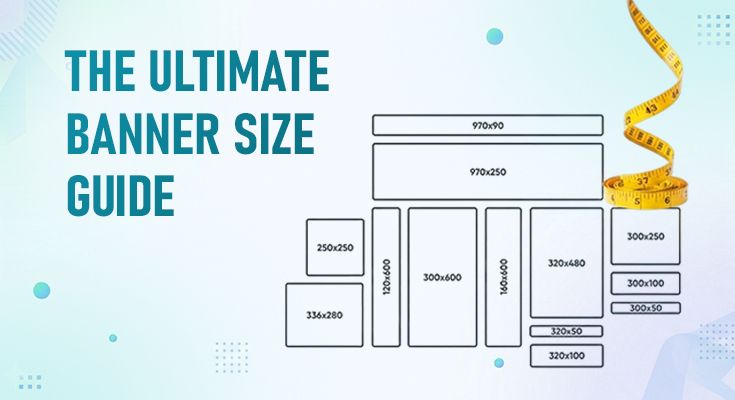
Common sizes: 300×250px, 300×600px, and 160×600px. Sidebar columns are typically 250–350px wide. These sizes also double as IAB standard display ad sizes, so they work as both website elements and ad placements. Announcement bars at the top of pages are typically 40–60px tall and full-width.
Email Banners
Email banners should match the template width, typically 600–900px wide. Most common widths: 600px, 700px, and 800px. Header banners: 90–200px tall. Hero email banners: 350–500px tall. Keep file size under 100 KB; many email clients don’t automatically load large images. Always design with a text fallback.
WebP format reduces image file size by up to 50% compared to JPEG with similar visual quality. Use WebP for web banners and email to significantly improve load times. All modern browsers support it.
Google Display & Advertising Banner Sizes
Display advertising is governed by the IAB (Interactive Advertising Bureau), which defines standard sizes accepted across virtually every ad network and publisher. A focused set of sizes covers 80–90% of all available inventory.
| Name | Size | Best For | Notes |
|---|---|---|---|
| Medium Rectangle Most Popular | 300×250 px | Sidebar, in-content | Highest reach; serves the most inventory globally |
| Leaderboard | 728×90 px | Top / bottom of page | Classic desktop format; very high visibility |
| Wide Skyscraper | 160×600 px | Sidebars | Tall vertical format; great for sidebars |
| Half Page | 300×600 px | Premium placements | High-impact; commands attention |
| Mobile Banner | 320×50 px | Mobile web | Most common mobile format; very high volume |
| Billboard | 970×250 px | Desktop premium | Large desktop placements on premium publishers |
Start with 300×250, 728×90, and 160×600; these three sizes cover most available display inventory. Add 300×600 and 320×50 for better mobile and premium coverage.
Technical Specs for Display Ads
File formats: JPG for photographic images (smallest file size), PNG for graphics with text and transparency, GIF for simple animations, HTML5 for interactive and rich media ads.
File size limits: Google Display Network recommends under 150 KB, with a 5 MB hard maximum. Most programmatic exchanges cap at 150–200 KB. Target under 100 KB for static ads.
Animation rules: Maximum 30-second animation loop; must stop automatically. Best practice is a 5–15 second loop with the core message visible in the first 5 seconds. Always include a static fallback frame.
Responsive Display Ads: Google’s Responsive Display Ads let you upload multiple images, headlines, and logos. The ad network then automatically combines and sizes them for each available slot, a single responsive campaign can cover all major display sizes without creating individual banners for each.
File Format & Technical Best Practices
Getting the dimensions right is only half the job. The right file format and technical settings determine whether your banner loads fast, looks sharp, and gets accepted by ad networks.
Which File Format Should You Use?
File Size Targets
| Banner Type | Target File Size | Why It Matters |
|---|---|---|
| Social media posts | Under 1 MB | Platform limit; faster upload |
| Website hero / background | Under 200 KB | Page load speed / Core Web Vitals |
| Display ad (Google) | Under 150 KB | Ad network acceptance rate |
| Email banner | Under 100 KB | Email client rendering |
| Logo / icon | Under 50 KB | Loads on every page |
Typography Rules for Banners
Small banner sizes (300×250, 320×50) demand concise messaging, limit primary text to 5–7 words maximum. Mobile banners require a minimum 18px headline font and 44×44px CTA buttons for tap accuracy. Never use paragraph text in ad banners, use short phrases or single benefit statements only.
Safe Zone Rule – Works for Every Platform
Keep all logos, key text, and CTAs within the center 80% of any banner. This area is guaranteed to be visible across all devices, screen sizes, and platform cropping rules. Anything in the outer 10% on each side may be hidden.
Frequently Asked Questions
Cover photo: 820×312px (desktop), 640×360px (mobile). Feed and ad images: 1200×628px (1.91:1 ratio). Stories and Reels: 1080×1920px. For ads, 1200×628px is the most versatile single size.
Use 1280×720px (16:9) as a minimum. For full-screen backgrounds, use 1920×1080px. Keep file size under 200 KB and all key content in the center 80% safe zone to avoid cropping on mobile screens.
The 300×250px Medium Rectangle has the highest reach and fits the most placements globally. Start with 300×250, 728×90, and 160×600; these three cover the majority of available display inventory. Max file size: 150 KB recommended, 5 MB maximum.
Instagram switched to a taller 3:4 portrait profile grid in January 2026. Design feed posts at 4:5 (1080×1350px) for best display and organic reach. Stories and Reels: 1080×1920px. Profile picture: 320×320px, displayed as a circle.
JPG for photographic banners (smallest size), PNG for graphics with transparency or sharp text, WebP for web and email (up to 50% smaller than JPG), GIF for simple animations (max 30-second loop), HTML5 for interactive rich media ads.
Yes, indirectly but significantly. Oversized banners slow page load time; a jump from 1 to 3 seconds increases bounce rate by 32%, which harms rankings. Google uses Core Web Vitals (including Largest Contentful Paint, often a hero banner) as a ranking factor. Always compress banners before uploading.
Conclusion
Getting banner sizes right is not optional; it determines whether your visuals look sharp or blurry, whether your ads get approved or rejected, and whether your website loads fast enough to hold a visitor’s attention. The platforms change their requirements regularly (as Instagram proved in January 2026), so keep this guide bookmarked.
That’s exactly why we built DesignWiz, so you never have to memorize a single dimension. Pick your platform, pick your template, and design at the perfect size every time.