


Product Updates
Discover all the new stuff we’ve worked in a chronological order
Introducing
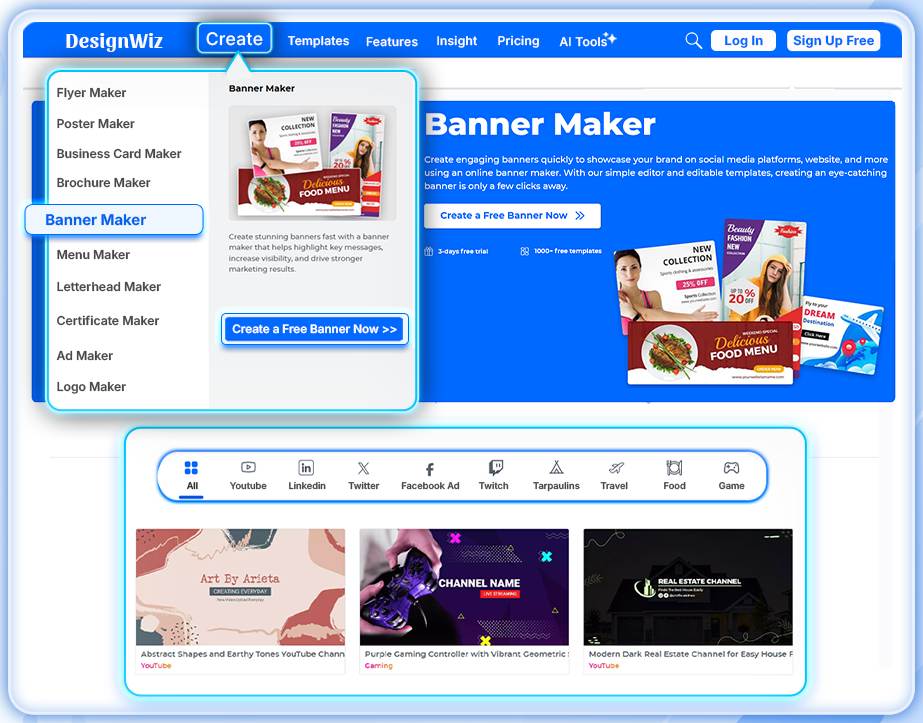
Dedicated Banner Category
05-10-2026 We’ve introduced a dedicated Banner category in DesignWiz, giving you quick access to banner templates designed for a variety of promotional and digital marketing needs. Where to Find It: DesignWiz Website → Create → Banner Maker Why You’ll Love It: The new Banner category makes it easier to discover suitable designs for: Promotional campaigns Website banners Social media promotions Online advertisements Marketing and announcement graphics Start exploring the new Banner category in DesignWiz today! Click here to try it now
Introducing
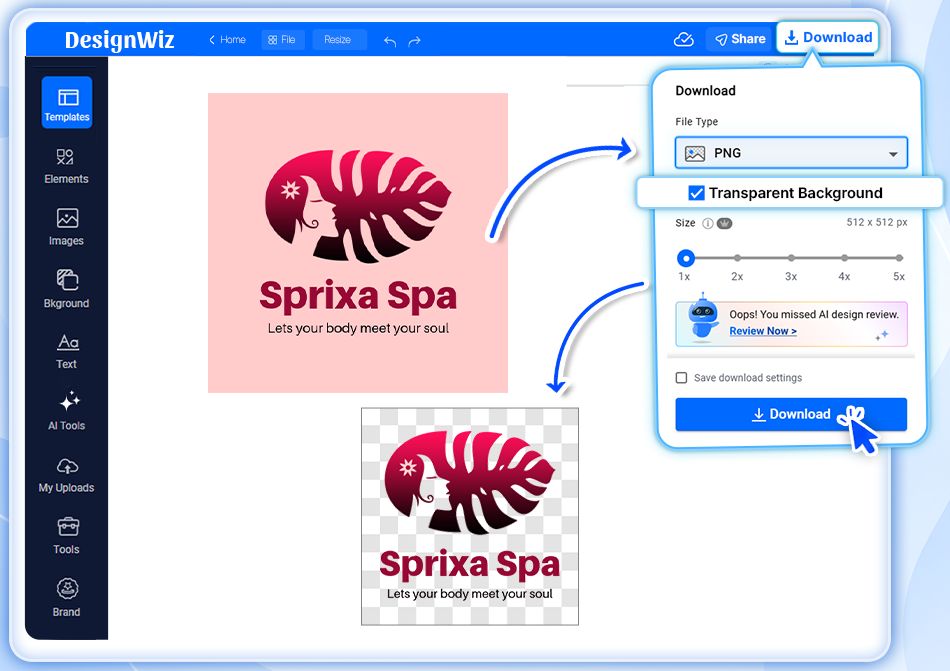
Transparent PNG Export
29-09-2026 You can now download your designs as PNG files with no background, making it easier to reuse your designs across different projects without unwanted white or colored backgrounds. Where to Find It: Editor → Download → PNG Why You’ll Love It: Transparent PNGs are especially useful for creating and reusing: > Logos on websites, presentations, and marketing materials > Overlays for photos, videos, and other designs > Cut-outs and isolated graphics > Reusable design assets across multiple projects Whether you're creating a logo, adding a graphic to another design, or building a collection of reusable assets, transparent PNG export gives you more flexibility.
Introducing
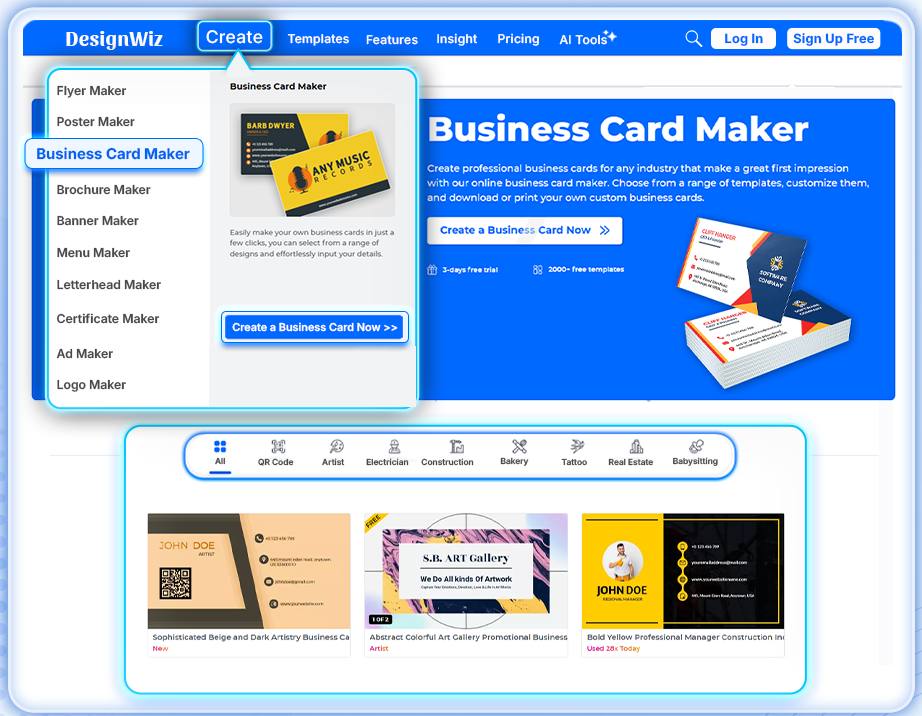
Dedicated Business Card Category
14-09-2026 We’ve introduced a dedicated Business Card category featuring a collection of professionally designed, ready-to-customize templates. Whether you’re creating a business card for yourself, your team, or your small business, you can now quickly find relevant designs and customize them to match your brand. Where to Find It: DesignWiz Website → Create → Business Card Maker Why You'll Love It; With the new Business Card category, DesignWiz expands its professional design options and makes it easier for small businesses, entrepreneurs, freelancers, and professionals to create polished business materials. Start exploring the new Business Card templates in DesignWiz and create a design that represents your brand. Click here to try it now
Introducing
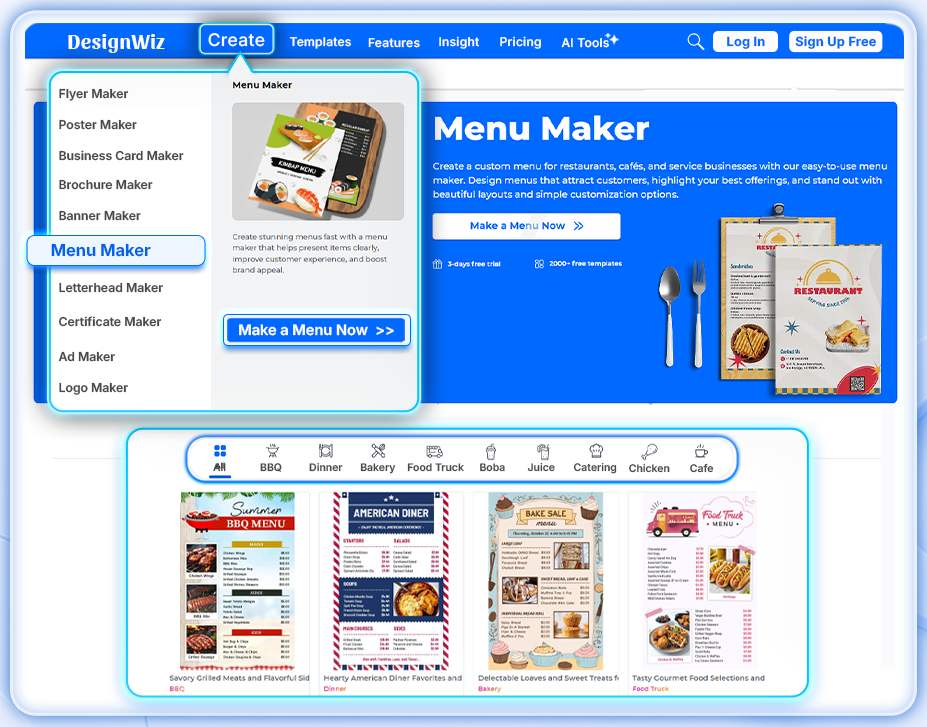
Dedicated Menu Category
11-09-2026 We’ve added a dedicated Menu category to DesignWiz, making it easier to find and customize templates for restaurants, cafés, food businesses, and more. Where to Find It: DesignWiz → Create → Menu Maker Create professional menus faster by customizing templates with your dishes, prices, branding, images, and other details. Start creating your next menu with DesignWiz today! Click here to try it now
Introducing
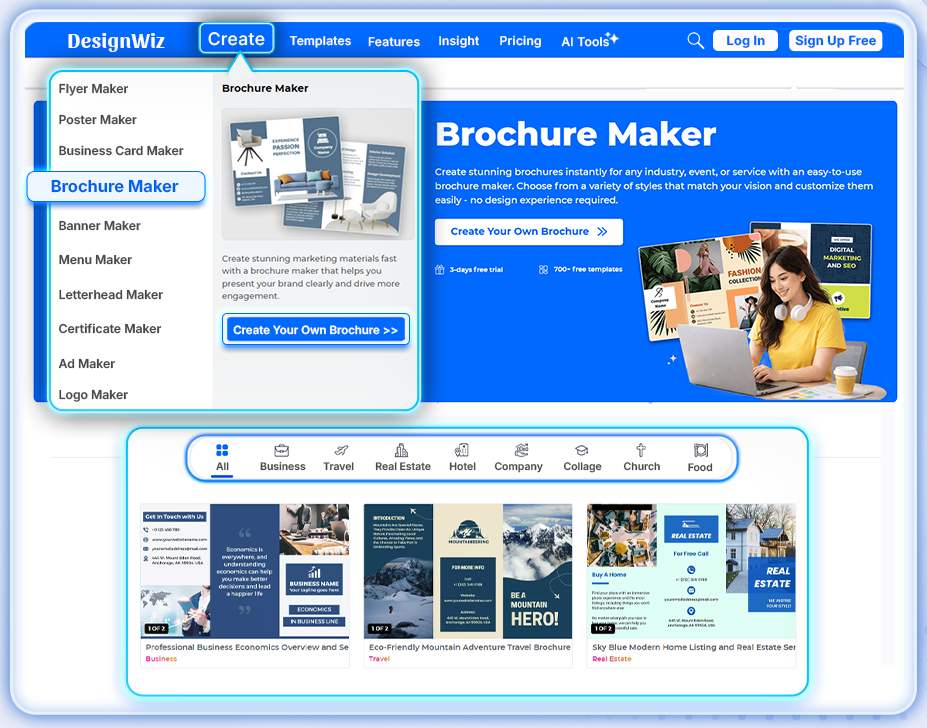
Dedicated Brochure Category
21-08-2026 We’ve added a dedicated Brochure category to DesignWiz, making it easier to discover and create professional brochure designs. Where to find it: DesignWiz → Create → Brochure Maker Why You’ll Love It: Explore relevant brochure templates and design options in one place, helping you create eye-catching brochures faster and more easily. Start creating your next brochure with DesignWiz today! Click here to try it now
Introducing
AI Image Expand
19-08-2026 We’ve added a new AI-powered Image Expand tool that intelligently extends an image beyond its original edges, generating new visual areas that naturally blend with the existing content. Where to Find It: Dashboard → AI Tools → AI Image Expand Editor → AI Tools → AI Image Expand Editor → Image Tooltip → AI Edit → AI Expand Why You'll Love It: With AI Image Expand, you can quickly adapt images to different design sizes and layouts without manually recreating or extending missing areas. Click here to try it now
Introducing
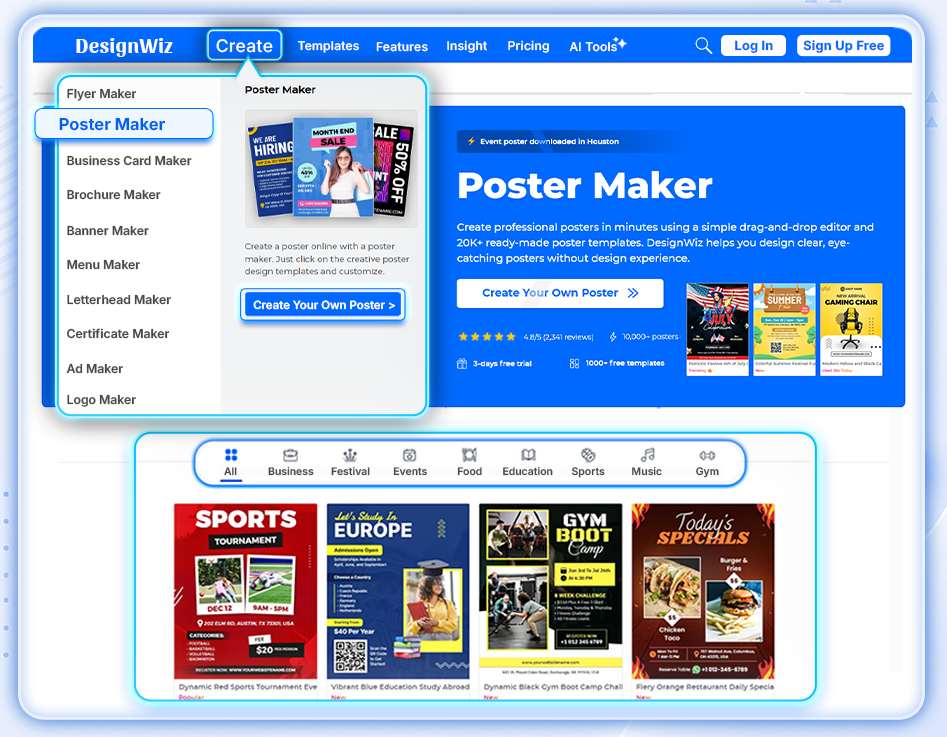
Dedicated Poster Category
17-08-2026 Create eye-catching posters faster with our new Poster category on DesignWiz. Explore a dedicated collection of poster templates and enjoy a more focused design experience tailored for poster creation. Where to Find It: DesignWiz → Create → Poster Maker Why You’ll Love It: The new Poster category makes it easier to discover poster templates and quickly get started with designs for events, promotions, announcements, and more. Start creating your next poster with DesignWiz today! Click here to try it now
Introducing
AI Image Quality Enhancer
14-08-2026 Enhance your images with AI to improve resolution, sharpen details, and make photos look clearer and more professional in just a few clicks. Where to find it: Dashboard → AI Tools → AI Image Enhancer Editor → AI Tools → AI Image Enhancer Editor → Image Tooltip → AI Edit → AI Image Enhancer Why you'll love it: Instantly improve image quality without complex editing, helping you create polished, high-quality designs faster. Click here to try it now
Introducing
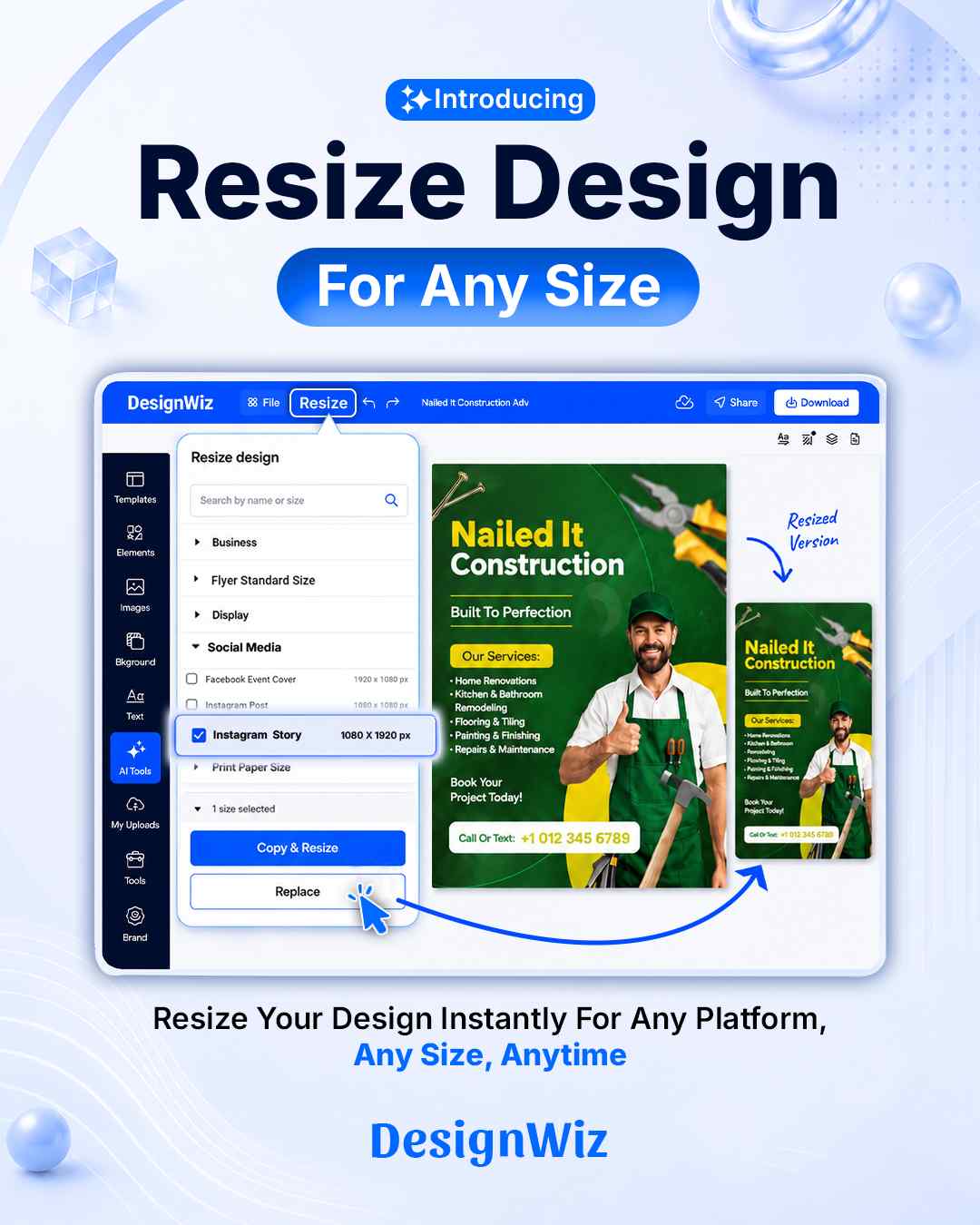
Design Resize
12-08-2026 Resize your designs into multiple formats with just a few clicks - no need to start from scratch. Simply choose a new size, and your design adapts effortlessly. Where to find it: Design Editor → Top Menu → Resize Why you'll love it: Save time, streamline your workflow, and quickly repurpose a single design for multiple platforms and marketing channels.
Introducing
AI Background Generator
10-08-2026 Creating stunning visuals is now easier with our new AI Background Generator. Generate beautiful, context-aware backgrounds instantly without leaving the editor. Simply describe the background you want, and AI will create high-quality visuals that perfectly complement your design - saving time while giving you more creative freedom. Where to find it: Dashboard → AI Tools → AI Background Generator Editor → Background → AI Background Generator Editor → AI Tools → AI Background Generator Why you'll love it: > Generate unique, AI-powered backgrounds in seconds. > Create professional, context-aware designs effortlessly. > Save time and boost creativity without searching for background images. > Enhance your workflow with seamless AI assistance.
Introducing
Smart Spelling Checker
07-08-2026 Creating polished, error-free designs is now easier than ever with our new Full Template Spelling Checker module. With a single scan, DesignWiz reviews all the text in your design, highlights spelling and text issues, and shows the total number of errors found. Users can then correct all detected issues instantly with a one-click fix, making proofreading faster and more efficient. Where to find it: DesignWiz Editor → Top Panel → Fix Spelling Why you'll love it: > Scan your entire design for spelling and text issues. > View the total number of errors at a glance. > Save time with instant, one-click corrections. > Create polished, professional, and error-free designs with confidence.
Introducing
AI Logo Generator
05-08-2026 Designing a logo is now faster and easier with our new AI Logo Generator, available directly inside the DesignWiz Editor. Simply open the AI Logo Generator, describe your brand or idea, and let AI generate unique logo concepts in seconds - without leaving your design workflow. Whether you're starting a new business, refreshing your brand, or creating a design for a client, you can quickly generate professional-looking logos and continue editing them instantly. Where to find it: AI Tools → AI Logo Generator Editor → AI Tools → AI Logo Generator Why you'll love it > Generate unique logo ideas in seconds. > Create and edit logos without leaving the editor. > Speed up your branding and design workflow. > Make the most of AI-powered creativity directly within your projects. Start creating smarter with the new AI Logo Generator and bring your brand ideas to life in just a few clicks! Click here to try it now
Introducing
Smart AI Writer
03-08-2026 Creating compelling content is now faster and easier with our enhanced AI Writer. The updated AI Writer delivers faster responses, improved tone accuracy, and more relevant content tailored to a wide range of industries. Whether you're writing marketing copy, business promotions, social media posts, or event announcements, you can generate polished content in seconds. Where to find it: Editor → Text Tools Panel → AI Writer Editor → AI Tools → AI Writer Why you'll love it > Generate content faster than ever. > Enjoy more accurate tone and context. > Get industry-relevant copy for better results. > Create high-quality designs with less effort. Spend less time writing and more time designing with the improved AI Writer.
Introducing
AI Sticker Generator
31-07-2026 Creating custom stickers is now faster and easier with the new AI Sticker Generator. Simply describe your idea, and DesignWiz will instantly generate a unique sticker with automatic background removal and clean, polished outlines - ready to use in your designs. Where to find it: Editor → Elements Tools Panel → AI Sticker Generator Editor → AI Tools → AI Sticker Generator Why you'll love it > Turn text prompts into custom AI stickers in seconds. > Get clean cutouts without manual editing. > Add fun, engaging visuals to flyers, social posts, and more. > Create eye-catching designs that encourage sharing and help your content stand out. Click here to try it now
Introducing
Flyer to AI Video
29-07-2026 Bring your designs to life with our newest AI feature! You can now transform any existing flyer into a stunning AI-generated video in just a few clicks - no video editing experience needed. Where to find it: Dashboard→ AI Tools → Flyer to AI Video DesignWiz Editor → AI Tools → Flyer to AI Video Why you'll love it: > Instantly convert static flyers into engaging videos. > Create eye-catching content for social media in minutes. > Save hours of manual video editing. > Repurpose your designs across multiple formats to increase reach, engagement, and conversions. Click here to try it now
Introducing
AI Image Generator
27-07-2026 Bring your ideas to life with AI Image Generator in DesignWiz. Simply enter a text prompt, and the latest AI image models will create high-quality, unique visuals in seconds - right inside the editor. Where to Find It: Editor → Image Tools Panel → AI Image Generator Editor → AI Tools → AI Image Generator Why You'll Love It: Create custom, commercial-ready images for products, events, social media, and marketing campaigns without leaving DesignWiz. Turn your imagination into stunning visuals faster than ever. Click here to try it now
Introducing
AI Poster Maker
24-07-2026 Create stunning posters in seconds with AI Poster Maker. Simply enter a prompt, and AI will generate a professional-quality poster complete with AI-generated visuals, helping you bring your ideas to life faster than ever. Where to find it: > DesignWiz Dashboard → AI Tools → AI Poster Maker > AI Poster Generator (https://designwiz.com/ai-poster-generator/) Why You'll Love It: * Generate eye-catching posters from simple text prompts. * Create unique AI-powered visuals without design expertise. * Save time while producing high-quality, on-brand designs. * Turn ideas into ready-to-use posters in just a few clicks." Click here to try it now
Introducing
Sample QR Replace Suggestion
22-07-2026 We've introduced a new smart reminder to help you avoid exporting designs with demo QR codes. If your design contains the default designwiz.com demo QR code, you'll now receive a notification before export, prompting you to replace it with your own QR code. This helps ensure your final design directs your audience to the correct destination. Why you'll love it: * Prevents accidental exports with demo QR codes. * Helps ensure your QR code points to the correct website or content. * Saves time by catching the issue before your design is downloaded. This small improvement helps make every exported design more accurate and ready to share with confidence.
Introducing
Publish Your Flyer as a Website
20-07-2026 Turn your flyer into a live, interactive website in just a few clicks. With Publish as Website, you can instantly convert any flyer into a single-page website that anyone can access through a shareable link. Your published design keeps its visual appeal while adding interactive elements such as clickable phone numbers, email addresses, website links, and other call-to-action buttons. Where to find it: Editor → Share → Publish as Website Why you'll love it: * Turn static flyers into interactive web pages. * Make phone numbers, emails, and links clickable. * Share your design with a simple URL - no website builder required. * Perfect for businesses, events, promotions, portfolios, and more. * Reach more people and encourage better engagement with actionable content. Whether you're promoting an event, showcasing your business, or sharing important information, Publish as Website makes it easier than ever to create a professional online presence directly from your design.
Introducing
AI Language Translation
17-07-2026 Break language barriers and design for a global audience with AI Translation. You can now create and edit flyers in multiple languages - including Spanish, French, Hindi, and more, directly from the editor. Instantly translate your content and personalize your designs for different regions without leaving the app. Where to find it: Editor → Top Header Menu → AI Translate Why you'll love it: * Translate flyers into multiple languages in seconds. * Reach a wider audience with localized content. * Personalize designs for customers in their native language. * Save time by eliminating manual translation.
Introducing
Auto Suggest QR Code
10-07-2026 Creating actionable flyers just got easier. With our new "Auto Suggest QR Code" feature, DesignWiz automatically analyzes your design content and recommends the most relevant QR code action - whether it's a "Call, Address, Website, Email, or Map". Simply select the suggested option and add the perfect QR code to your design with a single click. Why You'll Love It: * Save time by eliminating manual QR code selection. * Create more engaging and actionable flyers. * Help customers connect with your business faster. Try it today and make every flyer work smarter!
Introducing
BrandKit Is Here!
08-07-2026 Creating on-brand designs is now easier than ever with Brandkit. Brandkit lets you save and organize your brand assets - including colors, fonts, logo, contact, etc. - in one place. Once your brand assets are set up, you can quickly apply them to your designs, helping you maintain a consistent look across every project. Why you'll love it: * Keep every design aligned with your brand identity. * Save time by reusing your brand colors, fonts, and logos. * Reduce manual edits and rework with consistent branding from the start. * Create professional, cohesive designs faster. Whether you're designing marketing materials, social media posts, or business documents, Brandkit helps ensure every design reflects your brand with just a few clicks.