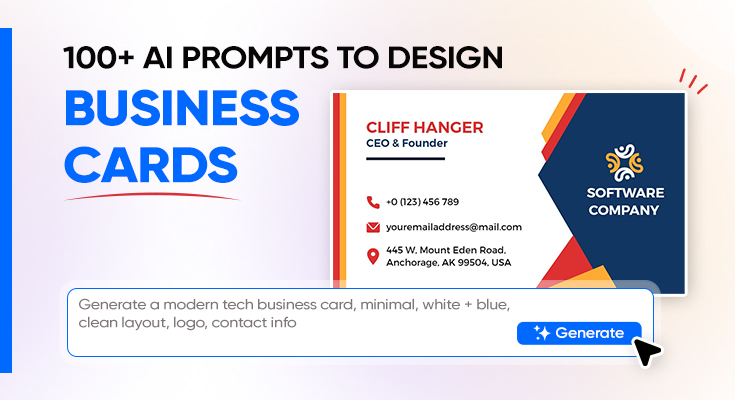
Your business card is often the first physical impression you make, and the quality of that impression comes down to one thing: how well your design communicates who you are. Weak AI prompts produce generic, forgettable cards; strong ones deliver polished, print-ready designs in seconds. This 2026 guide gives you 100+ AI business card prompts, organized by profession and style, plus a proven formula to write your own.
100+ AI Business Card Prompts for Every Use Case
🧼 Minimal & Professional AI Business Card Prompts
- “A minimalist business card for a corporate consultant, white background, single thin black horizontal rule separating the name from the contact details, name in bold dark sans-serif at the top, title and phone in a light-weight typeface below, and a small square logo in the bottom-left corner.”
- “A professional business card for a financial advisor, matte navy blue background, name in elegant gold serif typography centered on the card, title in a slim white sans-serif below, and contact details quietly listed at the base with a gold divider line.”
- “A clean two-sided business card for a lawyer, front: white with a single bold black serif name and gold firm logo; back: matte charcoal with contact info in cream sans-serif and a subtle scales-of-justice watermark.”
- “A minimal business card for an architect, portrait orientation, off-white background, name in large spaced uppercase sans-serif, firm name in a hairline font below, and a tiny line-drawing of a building as the only graphic element.”
- “A sleek corporate business card for a bank executive, horizontal layout, deep charcoal background, name in a crisp white medium-weight sans-serif, gold embossed job title below, and a minimalist bank logo mark on the right edge.”
- “A modern professional card for an HR manager, two-column layout on white, name and title stacked in the left column in dark navy, contact details right-aligned in the right column in a lighter tone, and a simple geometric logo mark.”
- “A clean executive card for a CFO, horizontal layout, white background with a single bold navy left-border stripe, name and credentials in dark type flush left, company logo anchored in the bottom-right corner.”
- “A professional business card for a corporate trainer, white background, horizontal rule in teal separating name from title, contact details in a three-column micro-grid at the bottom.”
🏢 Industry-Specific AI Business Card Prompts
Targeted AI business card prompts for specific industries from real estate and healthcare to legal, education, and hospitality.
Real Estate
- “A real estate agent business card, horizontal layout, large high-quality property photo spanning the back, front: white background with agent name in bold navy serif, realtor badge, phone and email in a clean footer strip.”
- “A luxury real estate business card, matte black front with gold foil agent name, back: full-bleed architectural photo with contact details in a frosted white overlay band at the bottom.”
- “A property developer’s business card, charcoal background, geometric skyline silhouette illustration running along the base, bold white name and developer title, and a clean contact grid in light gray.”
Healthcare & Medical
- “A doctor’s business card, clean white background, name with MD credentials in navy bold sans-serif, specialty in teal italic below, clinic address and phone in a small structured block, and a subtle caduceus icon in the corner.”
- “A dentist’s business card, bright white background, tooth icon illustration in soft mint, name in bold dark blue, clinic name in a lighter weight below, and a QR code linking to appointment booking.”
- “A mental health counselor’s business card, soft sage green background, name in warm charcoal serif, credentials after the name in a lighter tone, and a calm abstract ripple-wave graphic running along the bottom edge.”
Legal
- “An attorney’s business card, deep navy background, name in gold serif with Esq. credential, law firm name in white sans-serif below, bar admission state in a small italic, and contact details in a cream-toned type.”
- “A paralegal’s business card, white background, dark charcoal name in bold, law firm logo mark in navy upper right, and contact details in a two-row footer in gray.”
Education
- “A university professor’s business card, off-white background, name and academic title in deep burgundy bold serif, department and institution in dark gray, contact details including office hours in a structured, clean layout.”
- “A private tutor’s business card, warm cream background, illustrated pencil and open book in a flat icon style, name in bold rounded sans-serif, subjects taught in small colored tags below, and phone and website at the base.”
Hospitality & Tourism
- “A hotel concierge business card, gold and white palette, elegant serif name and title on the front, back: a full-bleed photo of the hotel lobby with contact details in a translucent band.”
- “A travel agent’s business card, white background, world map watermark in light blue behind the content, name in bold navy, tagline ‘Your Journey Starts Here’ in italics, and contact info with a globe icon.”
Finance & Accounting
- “A CPA’s business card, clean white horizontal layout, name with CPA credential in dark bold type, firm name in a lighter weight below, contact block in a structured two-column grid, and a minimal bar-chart icon as the sole graphic.”
- “A financial planner’s business card, deep forest green background, name in cream serif, credentials in gold, and a subtle upward-trend graph line as a background accent element.”
Tech & Software
- “A software engineer’s business card, dark mode aesthetic, near-black background, name in white monospace type, GitHub and LinkedIn handles in neon green, and a subtle binary-code pattern as a background texture.”
- “A UX designer’s business card, white front with color-blocked back in cobalt blue, front: name and title in a geometric sans-serif; back: portfolio URL in oversized white type and three micro-screenshots of design work.”
🎯 Personal Brand & Freelancer AI Business Card Prompts
- “A freelance photographer’s business card, front: full-bleed black-and-white landscape photo; back: white background, name in bold black serif, ‘Photographer’ title in fine italic, Instagram handle and website in a clean footer.”
- “A graphic designer’s business card, front: bold color-blocked design in electric yellow and black with name in large reversed type; back: white with portfolio URL and social handles.”
- “A freelance copywriter’s business card, white background with a typewriter-key texture overlay, name in bold typewriter-style serif, tagline ‘Words That Work’ in italic below, and contact details in a clean footer.”
- “A personal brand card for a life coach, warm coral and cream palette, name in a flowing script typeface, coaching tagline in a bold sans-serif below, website and Instagram in the footer.”
- “A freelance illustrator’s business card, front: one of their original illustrations as a full-bleed design; back: white with name in a hand-lettered style font, website, and email.”
- “A social media consultant’s business card, vibrant gradient background (pink to purple), name in white bold rounded sans-serif, ‘Social Media Strategist’ in a lighter weight below, and social platform icons in a row at the bottom.”
- “A freelance videographer’s business card, dark cinematic background, name in white clean sans-serif, cinematography reel QR code in the bottom-right, and a film-strip illustration running along one edge.”
- “A content creator’s business card, bold Gen-Z aesthetic, bright neon yellow background, name in chunky black uppercase, platform handles in black bubble typography, and a bold star icon element.”
- “A fashion stylist’s business card, elegant editorial look, cream background, name in tall condensed serif, ‘Wardrobe Stylist’ in spaced italic below, contact details in a fine-line footer, and a minimal fashion sketch in the corner.”
- “A personal trainer’s business card, dark gym aesthetic, matte black background, name in bold white condensed sans-serif, specialties listed in bright orange below.”
🎉 Creative Themes & Special Style AI Business Card Prompts
Expressive AI business card prompts for bold creative aesthetics: retro, luxury, neon, vintage, botanical, and more.
Retro & Vintage
- “A retro vintage business card, aged kraft paper background, distressed ink-stamp texture overlay, name in a 1950s-inspired slab serif, role in a ribbon banner graphic, and contact details in a typewriter-style typeface.”
- “An Art Deco business card, matte black background, gold geometric border pattern, name in a tall Art Deco serif typeface, and thin gold hairlines framing the content block.”
- “A vintage apothecary-style business card, cream background, ornate oval border illustration, name in elegant Victorian serif, and decorative botanical sprig illustrations in the corners.”
Luxury & Premium
- “A luxury business card for a jewelry designer, matte black background, gold foil name in a refined serif, front: minimal and understated; back: full-bleed macro photo of a signature piece.”
- “A premium business card for a luxury interior designer, cream and gold palette, name in gold foil brush-script, back: matte black with studio name in embossed gold type and contact details in champagne.”
- “An ultra-luxury card for a private wealth manager, thick cotton-paper texture, blind-embossed monogram, name in fine serif, and no visual clutter, pure restraint communicates exclusivity.”
Neon & Bold
- “A neon business card for a DJ, pitch-black background, electric pink name in a glowing neon sign-style typeface, neon blue accent underline, music genre tags in small glowing capsule labels.”
- “A bold neon business card for a tattoo artist, black background, vibrant magenta name in a custom-feel heavy typeface, neon green studio name below, and a flash-art style illustration on the back.”
- “A cyberpunk aesthetic business card, dark matte background, holographic foil elements, name in a futuristic stencil typeface, and geometric circuit-line accents in electric blue.”
Botanical & Nature
- “A botanical business card for a florist, cream background, delicate watercolor floral illustrations framing the edges, name in a graceful script, and studio name and contact in fine green sans-serif.”
- “An earthy nature-inspired card for an eco brand, recycled paper texture, botanical leaf pattern in muted greens, name in a warm earthen brown serif, and a sustainability leaf icon beside the email.”
- “A garden designer’s business card, soft sage green background, hand-drawn botanical line art across the back, name in a delicate serif on the front, and a small illustration of a trowel and seedling.”
Playful & Creative
- “A children’s party planner business card, pastel rainbow gradient, illustrated balloons and confetti, name in a chunky bubbly typeface, and phone/Instagram in a fun rounded sans-serif.”
- “A quirky business card for a stand-up comedian, white background, speech bubble graphic containing the name, tagline ‘Making Mondays Bearable’ in italic, and a tiny mic-drop illustration.”
Exploring ready-to-use business card layouts can also help you generate ideas for professional and creative card designs.
💻 Tech & Corporate AI Business Card Prompts
- “A startup founder’s business card, bold minimalist design, white front with the company logo mark in a single bold color, name in dark, clean sans-serif, and a back in solid brand color with the company tagline in white.”
- “A data scientist’s business card, dark mode look, near-black background, name in white monospace, ‘Data Scientist | ML Engineer’ in a neon green accent below, and a subtle data-scatter-plot graphic in the background.”
- “A product manager’s business card, clean white horizontal layout, name in bold sans-serif, PM title in a colored badge label, LinkedIn QR code in the bottom-right, and a roadmap-style graphic accent.”
- “A cybersecurity analyst’s business card, dark matte background, name in a bold tech typeface with a shield icon beside it, role in a red accent color, and binary-pattern texture across the back.”
- “An AI researcher’s business card, clean white front, name in bold black serif, institution name in a lighter weight, and back: a striking network node visualization in a dark background.”
- “A CTO’s business card, sophisticated dark charcoal front, company logo in top-right, name in white bold sans-serif, CTO title in a teal highlight, and contact block cleanly structured at the base.”
- “A mobile app developer’s business card, white background, app icon grid arranged as a background texture on the back, front: name in a clean, rounded sans-serif, ‘iOS & Android Developer’ in a lighter weight, and GitHub link.”
- “A cloud architect’s business card, soft gray background, stylized cloud icon as the hero element, name in dark bold type, AWS/Azure certification badge in small type below, and contact block in a clean grid.”
- “A tech startup business card for a co-founder, bold two-tone design, front: white with name and co-founder role; back: solid electric blue with white company name in large type and the website URL.”
Learn more: These prompts cover a wide range of styles, and understanding different types of business cards can help you choose the right format for your design.
How to Write the Best AI Business Card Prompts (with Examples)
Every great AI business card starts with a clear, complete prompt. Think of your prompt as a mini creative brief. The more direction you give the AI, the more polished and purposeful the result. Here are ten proven strategies, each with a before-and-after example.
1. Lead with Purpose and Audience
Before anything else, tell the AI who this card is for and what it needs to achieve. A card for a luxury wedding photographer communicates differently than one for a startup CTO.
- Weak: “A business card for a photographer.”
- Strong: “A business card for a luxury wedding photographer targeting high-end clients, conveying elegance and quiet confidence.”
2. Name a Specific Visual Style
Generic adjectives like “modern” or “professional” give the AI little to work with. Name a real design style or aesthetic reference instead.
- Weak: “A modern, professional business card.”
- Strong: “A business card with a Swiss grid design aesthetic, clean geometry, disciplined spacing, and no decorative elements.”
3. Define the Color Palette as Mood
Instead of just naming colors, describe the feeling they should create. This guides the AI toward a more cohesive tonal result.
- Weak: “Use blue and white.”
- Strong: “Navy and ivory palette that communicates trust and understated authority, no bright accents.”
4. Specify Typography Direction
Type choices carry enormous personality. Guide the AI toward the right typographic voice for your brand.
- Weak: “Nice fonts.”
- Strong: “Name in a bold condensed sans-serif; contact details in a hairline weight of the same family for contrast.”
5. Describe the Layout and Hierarchy
Tell the AI which element should dominate, what comes second, and how the card is structured.
- Weak: “Include name, title, phone, and email.”
- Strong: “Name dominates the top third in large type; title sits below in a lighter weight; phone and email in a two-column micro-grid at the base.”
6. Mention Both Sides Intentionally
The back of a business card is prime real estate. Tell the AI exactly what goes there.
- Weak: “Design a business card.”
- Strong: “Front: white background with name, title, and contact. Back: full-bleed deep navy with the company logo in centered white type and a tagline below.”
7. Reference a Finish or Material Feel
AI generators respond well to finish cues, influencing texture, contrast, and overall richness of the design.
- Weak: “Make it look premium.”
- Strong: “Design it to look like a matte black card with spot UV on the name to simulate the contrast between flat and gloss in the layout.”
8. Add Emotion or Storytelling
The best business cards carry an emotional charge. Give the AI a mood word that goes beyond visual description.
- Weak: “A clean business card for an architect.”
- Strong: “A business card for an architect that communicates structural precision and creative vision, the design itself should feel like architecture.”
9. Describe What to Exclude
Telling the AI what NOT to include is just as valuable as telling it what to include.
- Weak: “Keep it simple.”
- Strong: “No decorative borders, no stock illustrations, no gradient backgrounds, just typography and one color accent.”
10. Iterate One Element at a Time
Once you have a base design you like, refine it with targeted follow-up prompts rather than starting over.
- Follow-up: “Keep everything the same but change the name typeface to a geometric sans-serif and increase the weight.”
- Follow-up: “Make the back of the card more dramatic – use a full-bleed black background with the logo in white.”
If you’re exploring other design formats beyond business cards, check out our AI brochure prompts to create professional marketing materials with the same level of precision.
The Formula for a High-Converting AI Business Card Prompt
The Formula
Example
“A horizontal business card for a luxury real estate agent targeting high-net-worth buyers. Matte black front, name in gold foil-style serif typography, title in cream below, and contact details in a fine white sans-serif footer. Back: full-bleed aerial property photograph with a translucent dark band across the bottom containing the website URL. No decorative elements – clean, restrained, and aspirational.”
With this framework, your prompts shift from basic instructions to strategic design briefs – resulting in business cards that look premium, feel intentional, and make a lasting first impression.
Learn more: With this framework, your prompts become strategic design briefs, helping you create better results when you know how to make a business card effectively.
FAQs
An AI business card prompt is a written description you give to an AI design tool, telling it exactly what kind of business card to create. The more specific your prompt covering layout, colors, typography, and style, the more polished and on-brand the result.
Yes. These prompts are written to work with DesignWiz AI Business Card Generator, but you can adapt them for other AI design platforms. The core principles of specificity, mood, and hierarchy apply universally.
Most designers find a strong result within 2–4 iterations. Start with a detailed prompt, evaluate the output, then adjust one or two specific elements in your follow-up prompt rather than rewriting everything from scratch.
Every business card should include your full name, job title, company name, phone number, email address, and website or LinkedIn URL. Depending on your industry, you may also add a QR code, physical address, or social media handles.
Absolutely. The back of a business card is valuable space. Use it for a bold visual, a portfolio sample, a QR code, a key service list, or a strong brand statement, anything that reinforces your identity and gives the recipient a reason to keep the card.
Conclusion
You now have 100+ field-tested AI business card prompts written as mini creative briefs across every major professional category, from clean corporate and industry-specific designs to bold personal brands and creative theme styles. Pair them with the prompt-writing formula and an iterative mindset. Head to DesignWiz’s AI Business Card Generator and put these prompts to work right now.