
freshchat icon chat icon loading icon

Share this template anywhere.

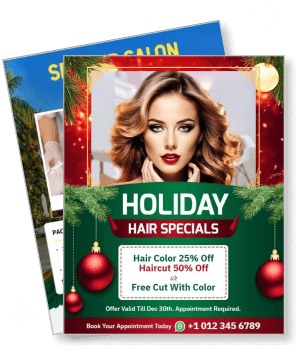
holiday hair specials discount offer with model and promotion details template

Holidays Flyer Templates

DesignWiz Holidays Flyer Templates help you promote festive events using ready made seasonal layouts for market details, party invites, sale offers, and holiday activities.
So easy to use. Made a flyer in less than 5 minutes and it looks beautiful. The makers of this app did a superb job. Thank you. — Althea Kerr
4.6/5 (From 380k reviews)

Create your own

{"148811":{"name":"festive-holiday-coquito-pre-order-promotion-flyer-template-hotxxs2b9aafc5.jpg","webp_name":"festive-holiday-coquito-pre-order-promotion-flyer-template-hotxxs2b9aafc5.webp","width":650,"height":800}} 148811
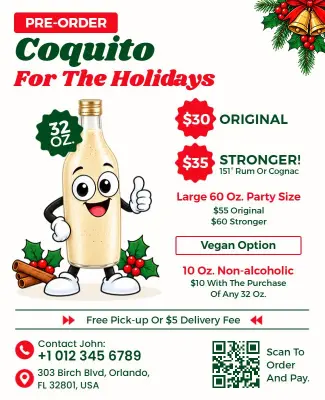
Festive Holiday Coquito Pre-Order Promotion Flyer Template
650 x 800 px

christmas
coquito
Show all keywords
Festive Holiday Coquito Pre-Order Promotion Flyer Template
{"570607":{"name":"holiday-window-painting-service-promotion-flyer-template-ozyni63c93e604.jpg","webp_name":"holiday-window-painting-service-promotion-flyer-template-ozyni63c93e604.webp","width":650,"height":800}} 570607
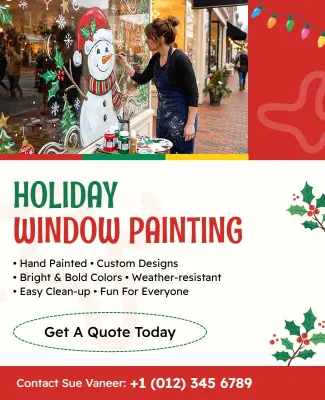
Holiday Window Painting Service Promotion Flyer Template
650 x 800 px

holiday
window
Show all keywords
Holiday Window Painting Service Promotion Flyer Template

How to customize a holiday flyer

No design skills needed. Choose a layout, add event details, adjust festive colors and fonts, then export a file you can print or share in minutes.

Corporate Growth Poster
1.

1. Pick a layout

Choose a holiday flyer layout for a market, sale, or party theme, then set page size first. Place the event name and date at the top so key details are easy to find on print or phone.

2.

2. Add key details

Add the event name, date, time, location, and contact information clearly. Include offer details, ticket prices, vendor lists, or registration links so guests have everything they need to attend.

3.

3. Use festive visuals

Use festive colors like red, green, and gold with holiday images of ornaments, snowflakes, or gift boxes. Keep text contrast high so your holiday flyer stays readable on screen and on print.

4.

4. Check print settings

Set margins and safe area, keep key text away from edges, and export at print quality. Preview at actual size so nothing looks soft, cropped, or misaligned when you print your holiday flyer.

5.

5. Export and share

Export a print ready PDF plus a share image, then test both on a phone screen. Reuse the same event details in social posts so your holiday flyers reach more people across groups and channels.

Trusted by Thousands

Tata Consultancy Services
Boston Consulting
AT&T
Avelo Airlines
Procter & Gamble
Ministry Of Health, Malaysia
Veterans Affairs
Detroit Government
New York University
Texas A&M University
Decathlon America
Warby Parker
Tata Consultancy Services
Boston Consulting
AT&T
Avelo Airlines
Procter & Gamble
Ministry Of Health, Malaysia
Veterans Affairs
Detroit Government
New York University
Texas A&M University
Decathlon America
Warby Parker
High performer asia
Front runners
capterra-reward-best-value

Other Flyer templates

Holidays Flyer Templates Design Ideas and Examples

Customize colors, photos, and wording to match the holiday theme, then keep the layout consistent so guests can spot the essentials in seconds. DesignWiz offers 100+ holiday flyers across festive themes and use cases, so you can start from a ready made layout and edit it for your event. Use these ideas to decide headline style, photo placement, and what to emphasize for your audience, then browse flyer templates when you want more options beyond your first pick.

Family holiday market events

Use warm color blocks, a short headline, and one festive image so the invitation reads quickly for families. Add vendor details, activity schedules, and parking notes, and keep the address easy to copy. For family focused holiday flyer examples, start from family holiday market event flyer template and swap the vendor names, date, and activity details.

Annual holiday party invitations

Lead with the party name, keep typography high contrast, and use a single festive photo with a clean background. Add a dress code when needed and a clear start time so guests know what to expect. For an annual holiday party invitation, adapt annual holiday party invitation flyer template and adjust colors to match your venue or company brand.

Spa and salon holiday packages

Highlight service packages and seasonal offers with a clean layout that puts pricing and booking details first. Use soft colors and high quality images to convey relaxation. For spa and salon holiday promotions, use spa and salon holiday packages flyer template and customize package names, prices, and service details.

Create Your Flyer Now!

Frequently Asked Questions (FAQs)

A clear holiday flyer includes the event name, date, time, full address, and RSVP method. Add ticket prices for sales, vendor lists for markets, and dress notes for parties. For charity events, include donation instructions and contact details. Keep the order consistent across holiday flyers so readers scan quickly and act without extra messages.

Start with a standard letter size layout for printing, then export a second version for social media sharing. Letter size works well with local printers and keeps text readable at a distance. For phone sharing, use a tall layout where the event name, date, and location remain large. Keep key information inside safe margins so nothing gets trimmed or cut off.

Use one strong festive image as the hero, keep text contrast high, and limit fonts to two. Lead with a clear headline naming the event type and date. Add a short benefit line telling readers why they should attend or shop. Use holiday colors like red, green, and gold, but keep the layout clean so the message remains scannable and easy to read.

Yes, keep the same layout structure and swap the color palette, headline, and images. Replace Christmas graphics with Halloween or New Year elements while keeping the same placement for event name, date, location, and RSVP. Adjust wording to match each holiday tone, but keep information order consistent. This helps you reuse holiday flyer templates without starting from scratch.

Use one short festive line, then switch to clear instructions. Place the event name and date first, then location, then RSVP so readers find what they need fast. Add offer details or ticket prices when relevant. For charity events, explain where donations go. Keep the tone warm and inviting. Short copy helps holiday flyers stay scannable in group chats and social feeds.

Choose colors that match the holiday theme. Red, green, and gold suit Christmas while orange, black, and purple fit Halloween. Blue and silver work for winter holidays, and pastels fit spring celebrations. Use high contrast between text and background so the flyer stays readable from a distance. Limit the palette to two or three main colors for a professional clean look.

Yes, QR codes help readers access tickets, registration pages, or store links directly from the flyer. Place the QR code near the call to action so it is easy to find. Add a short text label like Scan to RSVP or Get Tickets so readers know what happens when they scan. Test the code on a phone before printing to make sure it works correctly.

Start distributing holiday flyers four to six weeks before the event or sale. This gives guests enough time to save the date, make plans, and share with others. For markets and sales, send reminders two weeks before and again a few days before the date. For parties, send invites early and include a clear RSVP deadline so you can plan accordingly.

Yes, DesignWiz templates are mobile friendly and let you edit text, images, and colors from any device. Open the template in your browser, make changes using the drag and drop editor, and preview the result before you save. Export the final file as a PDF for printing or a PNG for social sharing without needing a computer.

Use letter size paper and set your printer to high quality mode. Export the flyer as a PDF at 300 DPI with CMYK color mode for the best print results. Check that margins and safe areas are correct so no text gets cut off. Print a test copy first to check colors and alignment, then run the full batch for your event.
Describe what you want to create with AI











