
freshchat icon chat icon loading icon

Share this template anywhere.

ugly christmas sweater party invitation family event anchorage december 25 template

Ugly Sweater Party Flyer Templates

DesignWiz Ugly Sweater Party Flyer Templates help you promote holiday events and festive contests fast with playful layouts, plus simple editing for event details, photos, and RSVP info.
Easy to use and lots of choices on style. Great app, I tried many others before I found this one and this one made up for all of the shity other ones out there. Thank you for creating such an amazing app. — Michael English
4.6/5 (From 380k reviews)

Create your own

{"832175":{"name":"ugly-sweater-christmas-party-flyer-template-w3sfshf6b84f05.jpg","webp_name":"ugly-sweater-christmas-party-flyer-template-w3sfshf6b84f05.webp","height":800,"width":650}} 832175
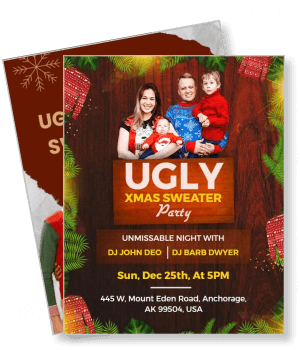
Festive Ugly Sweater Holiday Party Flyer Template
650 x 800 px

ugly
sweater
Show all keywords
Festive Ugly Sweater Holiday Party Flyer Template

How to customize an ugly sweater party flyer

No design skills needed. Choose a layout, add event and contest details, adjust colors and fonts, then export a file you can print or share in minutes.

Corporate Growth Poster
1.

1. Pick a layout

Choose an ugly sweater party flyer layout that fits your event type. Pick from festive Christmas designs, virtual party invites, or contest announcement styles and set page size first.

2.

2. Add key details

Add event name, date, start time, venue address, and ugly sweater dress code near the top. Include contest prize details and the RSVP line so guests know how to enter and respond fast.

3.

3. Use festive visuals

Use playful festive imagery with holiday colors like red, green, and gold that match the ugly sweater theme. Keep text readable with high contrast against background patterns and graphics.

4.

4. Check print settings

Check margins and safe area before exporting your ugly sweater party flyer. Keep contest rules and event details away from edges and confirm the resolution works for print and digital sharing.

5.

5. Export and share

Export a print ready PDF and a separate image file for social sharing. Reuse the same event copy in captions so ugly sweater party invites feel consistent and festive across platforms.

Trusted by Thousands

Tata Consultancy Services
Boston Consulting
AT&T
Avelo Airlines
Procter & Gamble
Ministry Of Health, Malaysia
Veterans Affairs
Detroit Government
New York University
Texas A&M University
Decathlon America
Warby Parker
Tata Consultancy Services
Boston Consulting
AT&T
Avelo Airlines
Procter & Gamble
Ministry Of Health, Malaysia
Veterans Affairs
Detroit Government
New York University
Texas A&M University
Decathlon America
Warby Parker
High performer asia
Front runners
capterra-reward-best-value

Other Flyer templates

Ugly Sweater Party Flyer Templates Design Ideas and Examples

Customize colors, patterns, and wording to match the ugly sweater theme, then keep the layout fun and festive so guests spot event details and contest info quickly. DesignWiz offers 30+ ugly sweater party flyers across Christmas party, virtual celebration, and contest announcement styles, so you can start from a ready made layout and edit it for your occasion. Use these ideas to decide headline style, graphic placement, and what to emphasize for your audience, then browse flyer templates when you want more options beyond your first pick.

Festive ugly sweater Christmas party flyer templates

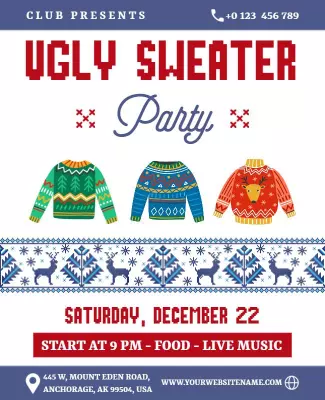
Use bold red and green colors, playful holiday patterns, and cheerful imagery like snowflakes or reindeer to capture the fun spirit. Add the date, time, venue, and dress code near the top so guests know it is an ugly sweater event. For a festive Christmas party flyer example, start from festive red ugly sweater Christmas party flyer template and swap the event name, date, and location details.

Virtual ugly sweater party celebration flyer templates

Lead with the event name and a bright holiday graphic, keep text clear and simple, and include video call details or a link for remote guests. Add the online platform name, start time, and any contest rules so virtual attendees know how to participate. For a virtual ugly sweater party invite, adapt virtual ugly sweater party celebration flyer template and customize the meeting details and holiday colors.

Holiday ugly sweater contest announcement flyer templates

Use festive typography, bold prize callouts, and playful sweater graphics to draw attention to the contest. Keep the contest rules, prize description, and entry deadline prominent so participants understand how to join. For an ugly sweater contest flyer, customize holiday ugly sweater contest announcement flyer template with your prize details and judging criteria.

Create Your Flyer Now!

Frequently Asked Questions (FAQs)

A clear ugly sweater party flyer includes the event name, date, start time, full venue address, and dress code specifying ugly sweaters. Add contest details and prize info if applicable. Include an RSVP method with a deadline and any ticket link. For virtual events, include the video call link or platform name. Keep the same detail order across flyers so guests can scan quickly and find what they need without extra searching.

Place the contest details near the headline or in a highlighted box. List the prize, judging criteria, and entry deadline clearly. Use phrases like Best in Show or Most Creative to describe categories. Add a note about how winners will be announced. Keep contest rules short and scannable. A well placed contest section on the flyer encourages participation and builds excitement around the ugly sweater theme.

Start with a standard letter size layout for printed flyers, then export a second version for phone screens and social sharing. Letter size is widely supported at print shops and keeps text readable from a distance. For digital use, a tall vertical layout works best where headline, date, and dress code stay visible. Keep all key details inside safe margins so nothing gets trimmed during the printing or cropping process.

Use bright holiday colors like red, green, and gold with playful patterns or sweater inspired graphics. Add cheerful elements like snowflakes, ornaments, or reindeer. Choose bold readable fonts that stand out against colorful backgrounds. Keep the layout balanced so it feels fun without being cluttered. A festive ugly sweater party flyer should feel energetic and inviting while still making event information easy to find.

Place contest rules in a dedicated section near the bottom or side of the flyer. List the prize, judging categories, and deadline in short bullet points. Keep rules brief so the main event details stay prominent. If space is tight, add a link or QR code to a full rules page. A clear contest section helps guests understand how to participate without cluttering the main event information area.

Yes. Keep the same layout structure and swap the relevant details. For in-person events, highlight the venue address and parking info. For virtual events, replace the location with a video call link or platform name. Adjust the wording to match the format while keeping date, time, and dress code in the same positions. This approach lets you reuse ugly sweater templates for different event types without starting from scratch.

Stick with traditional holiday colors like red, green, gold, and white for a classic festive look. Add pops of bright colors like blue or pink for a modern twist. Avoid dark or muted tones that do not match the playful ugly sweater theme. Use high contrast between text and background colors so details remain readable. A well chosen color palette helps the flyer feel cohesive and visually appealing to the audience.

A standout ugly sweater party flyer uses bold holiday colors, playful graphics, and clear typography that puts key details first. Include unique elements like a contest announcement, worst sweater prize, or themed activities. Keep the design fun but not cluttered so the holiday spirit comes through. A flyer that feels energetic and organized will attract more attention than generic holiday party layouts with too much text.

Use one short playful line at the top then switch to clear inviting language. List event name, date, time, venue, and dress code in that order. Add contest categories and prize details only when relevant. Keep sentences short and use festive words like jolly, merry, or festive. Effective holiday wording helps ugly sweater party flyers stay scannable in group chats and social media feeds for quick responses.

Yes. Use the same festive templates and adjust the tone to match the workplace. Keep the playful holiday spirit but add professional elements like the company name, department details, or team building notes. Include the office address, dress code expectations, and RSVP line. Corporate ugly sweater parties are popular team building events and a well designed flyer helps boost attendance and participation across the organization.
Describe what you want to create with AI











