freshchat icon chat icon loading icon

Share this template anywhere.

graduation photo frame kindergarten to 12th grade memories display template

Yearbook Poster Templates

DesignWiz layouts help yearbook committees, teachers, and student groups create memory posters fast with ready-made designs, plus simple editing for names, photos, and milestone details.
Create your own

{"668032":{"name":"modern-illustrated-football-yearbook-design-poster-template-fa2lb7d713ac5f.jpg","webp_name":"modern-illustrated-football-yearbook-design-poster-template-fa2lb7d713ac5f.webp","height":800,"width":650}} 668032
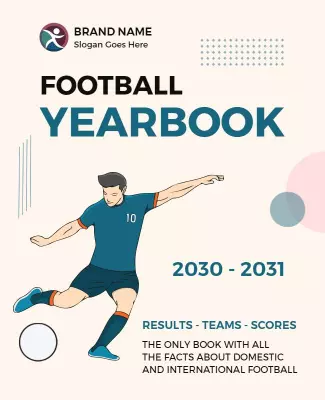
Modern Illustrated Football Yearbook Design Poster Template
650 x 800 px

football
yearbook
Show all keywords
Modern Illustrated Football Yearbook Design Poster Template
{"366203":{"name":"bright-blue-modern-yearbook-release-poster-template-0p0np4d8a84fda.jpg","webp_name":"bright-blue-modern-yearbook-release-poster-template-0p0np4d8a84fda.webp","height":800,"width":650}} 366203
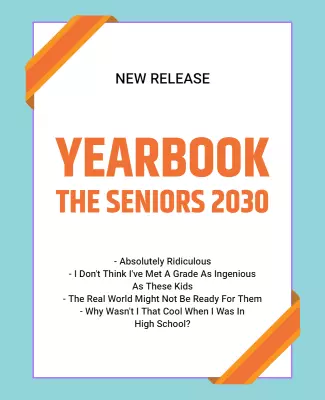
Bright Blue Modern Yearbook Release Poster Template
650 x 800 px

yearbook
release
Show all keywords
Bright Blue Modern Yearbook Release Poster Template
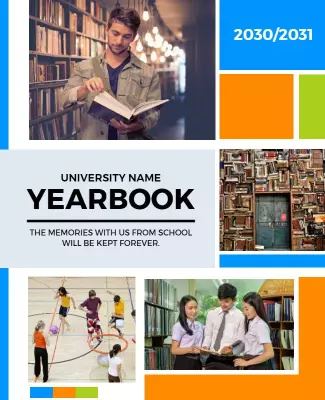
{"101706":{"name":"colorful-geometric-university-yearbook-memories-poster-template-nm3vx2d86a7e28.jpg","webp_name":"colorful-geometric-university-yearbook-memories-poster-template-nm3vx2d86a7e28.webp","height":800,"width":650}} 101706
Colorful Geometric University Yearbook Memories Poster Template
650 x 800 px

yearbook
university
Show all keywords
Colorful Geometric University Yearbook Memories Poster Template
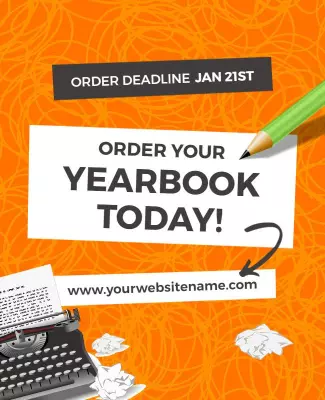
{"72092":{"name":"vibrant-orange-creative-yearbook-ordering-announcement-poster-template-qc5jzzd780091a.jpg","webp_name":"vibrant-orange-creative-yearbook-ordering-announcement-poster-template-qc5jzzd780091a.webp","height":800,"width":650}} 72092
Vibrant Orange Creative Yearbook Ordering Announcement Poster Template
650 x 800 px

yearbook
order
Show all keywords
Vibrant Orange Creative Yearbook Ordering Announcement Poster Template
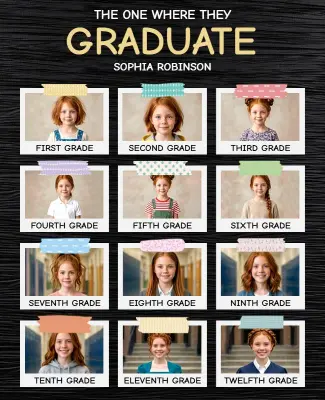
{"810118":{"name":"student-graduation-photo-collage-yearbook-poster-template-sn1w14ccd2d608.jpg","webp_name":"student-graduation-photo-collage-yearbook-poster-template-sn1w14ccd2d608.webp","width":325,"height":400}} 810118
Student Graduation Photo Collage Yearbook Poster Template
325 x 400 px

graduation
school
Show all keywords
Student Graduation Photo Collage Yearbook Poster Template

How to customize a school memory poster

No design skills needed. Pick a layout, add student photos and details, match school colors, then export a poster you can display or share in minutes.

Corporate Growth Poster
1.

1. Pick a layout

Choose a layout that fits your school theme, then set the page size first. Add the student name and graduation year so the hierarchy stays clear for both hallway display and digital sharing.

2.

2. Add student details

Add student name, graduation year, favorite quote, achievements, and club or sport highlights. Keep text short and heartfelt so readers connect quickly with each student unique story.

3.

3. Use strong photos

Use one strong hero photo plus a few candid or group shots, keep resolution high, and limit colors to 2 or 3 school tones. Leave space around the name so the poster stays readable from a distance.

4.

4. Check print settings

Confirm margins and safe area, keep all text away from edges, and export at print quality. Preview at actual size so nothing looks soft, cropped, or hard to read in hallway or event lighting.

5.

5. Export and share

Export a print-ready PDF for hallway display plus a digital version for school social media and email, then test both. Reuse the same student details in captions so posters and posts stay consistent.

Trusted by Thousands

Tata Consultancy Services
Boston Consulting
AT&T
Avelo Airlines
Procter & Gamble
Ministry Of Health, Malaysia
Veterans Affairs
Detroit Government
New York University
Texas A&M University
Decathlon America
Warby Parker
Tata Consultancy Services
Boston Consulting
AT&T
Avelo Airlines
Procter & Gamble
Ministry Of Health, Malaysia
Veterans Affairs
Detroit Government
New York University
Texas A&M University
Decathlon America
Warby Parker
High performer asia
Front runners
High performer small business

Other Poster templates

School Memory Poster Layouts: Design Ideas and Examples

Customize colors, photos, and typography to match your school theme, then keep the layout warm so students and families connect with the memories. DesignWiz offers layouts across 3 school scenarios, so you can start from a ready-made design and edit it for your yearbook promotions. Use these ideas to decide visual approach, headline style, and what to emphasize for your audience, then browse poster templates for more options beyond your first pick.

Senior spotlight and class memory posters

Use a nostalgic headline with the student name and graduation year, school colors for visual identity, and photo collage layout with individual portraits and group shots. Add favorite quotes and achievement highlights. For a senior-ready design, start from student graduation photo collage yearbook poster template and swap the photos and quotes for each student.

Yearbook release and ordering announcements

Use a bold headline with the yearbook name and release date, bright modern colors to catch student attention, and clear details for ordering deadlines, prices, and delivery dates. Add sample pages or cover previews. For a release-ready design, start from bright blue modern yearbook release poster template and update the release date and ordering link.

School sports and club recognition posters

Use an energetic headline with the team or club name and season, sport or activity-themed colors, and action photos or group shots with names and achievements. Add season highlights and award details. For a sports-ready design, start from modern illustrated football yearbook design poster template and adjust the team name and season results.

Create Your Yearbook Poster Now!

Frequently Asked Questions (FAQs)

Include the student name, graduation year or grade, a high-quality photo or portrait, and a favorite quote or personal message. Add achievements, clubs, sports, or a fun fact to make each poster personal and memorable. Consistent formatting across all posters helps the final yearbook look polished and professional. Keep the layout clean with clear sections for photos and text, and proofread all names and details before finalizing.

Choose format based on usage. A school memory poster works for classroom displays, hallway decorations, and yearbook promotions where multiple students are featured together. Use consistent layouts and school colors for unity. A graduation keepsake poster is more personal for individual students and families, featuring the graduate journey from kindergarten through senior year. Both formats benefit from photo collages, milestone captions, and warm typography that reflects the celebratory tone of the achievement.

Start with a standard 18x24 inch or A2 poster for hallway displays, graduation walls, and school events where visibility from a distance matters. For printed yearbook inserts, use 8.5x11 inches at 300 DPI for sharp quality. For digital sharing on school social media or email, export a vertical 1080x1350 px version where names and quotes remain readable. When you use customizable layouts with flexible exports, you can maintain consistent formatting across print and digital formats.

Use your school official colors as the primary palette to reinforce identity and create a cohesive look across all posters. Neutral backgrounds like white, cream, or soft gray let student photos stand out clearly. Gold and navy are classic combinations that feel timeless and appropriate for academic settings. High contrast between text and background is essential for readability in hallway displays and classroom walls with varied lighting. Limit your palette to 2 or 3 colors for a clean professional look.

Use a warm headline with the student name and a celebratory phrase like Class of or Best Memories, and pair it with a high-quality hero photo. Keep the layout simple with clear visual hierarchy: student name largest, graduation year and quote next, then achievements and activities. Limit fonts to one or two warm families and use high-contrast school colors. Adding decorative elements like stars, graduation caps, or photo borders can help the poster feel personal and celebratory without looking cluttered.

Popular themes include retro yearbook styles with vintage colors and fonts, modern minimalist layouts with clean lines and lots of white space, sports-inspired graphics with team colors and action shots, and academic achievement themes with honor roll details and award icons. Choose a theme that aligns with the overall yearbook concept and appeals to the student body personality and grade level. Themed posters create a cohesive look when displayed together at school events.

Display your memory posters in school hallways, near the main office, in classrooms, and on graduation walls for maximum visibility among students and parents. Place copies at school events like open houses, sports games, and parent-teacher conferences. For digital sharing, post on school social media pages, class groups, and email newsletters. Always include a QR code or short link so families can order yearbooks or leave messages directly from their phones during events and celebrations.

Most common mistakes include low-resolution photos that appear blurry when printed, overcrowding the layout with too many details that reduce readability, and inconsistent font styles across multiple posters that make the collection look disorganized. Always proofread names, dates, and quotes before finalizing. Use consistent margins, limit colors to school colors, keep fonts to one or two families, and use high-quality photos. Preview the poster at actual size in the conditions where it will be displayed.

Use the same template layout for every student poster to create a cohesive collection. Keep the same font families, color palette, photo placement, and text structure while swapping individual names, photos, and quotes. This approach ensures that when posters are displayed together on a graduation wall or yearbook spread, they look unified and professional. Create a style guide with font choices, color codes, and photo requirements to share with anyone contributing to the design process.

A free school memory poster can still look professional when the layout is clean and the content is accurate. Use one strong hero photo with good lighting and resolution, keep a tight color palette based on school colors, and limit fonts to one warm family. Avoid placing text over busy photographs and keep the student name and graduation year prominent. Use consistent spacing and align elements to a simple grid. Export at print quality for hallway display or high resolution for digital sharing. Clarity and warmth matter more than decorative effects.
Start Designing with AI
Can’t find the perfect design? Create instantly with AI.