freshchat icon chat icon loading icon

Share this template anywhere.

bogo burger menu design with prices and illustrations template

Burger Menu Templates

Build a burger menu that presents signatures, combos, sides, and specials in a clear layout. Edit it for a grill counter, fast-casual service, food truck, or seasonal refresh.
this is an amazing menu maker it's have 4000 + temples of menus more categories like burgers back cream and you fast food this is amazing very how can I tell you πŸ‡΅πŸ‡°m. riyan from pakistan β€” Mir Bux
4.8/5 (From 40k reviews)

Create your own

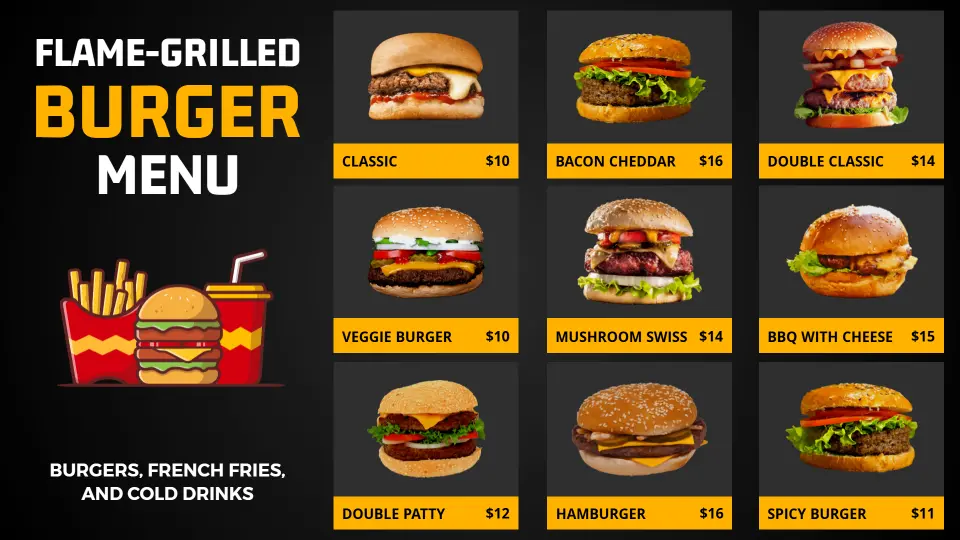
{"701661":{"name":"bold-black-and-yellow-burger-selection-for-restaurants-menu-template-dhom3698eb9b0b.jpg","webp_name":"bold-black-and-yellow-burger-selection-for-restaurants-menu-template-dhom3698eb9b0b.webp","width":1920,"height":1080}} 701661
Bold Black and Yellow Burger Selection for Restaurants Menu Template
1920 x 1080 px

menu
black
Show all keywords
Bold Black and Yellow Burger Selection for Restaurants Menu Template
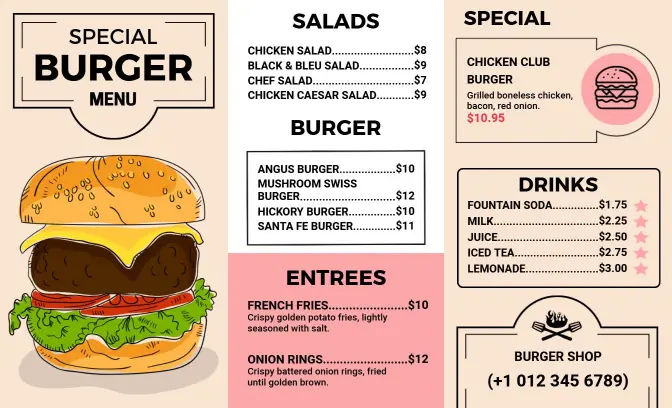
{"69753":{"name":"charming-cartoon-style-burger-and-fries-menu-template-ft5d1ybd35b94e.jpg","webp_name":"charming-cartoon-style-burger-and-fries-menu-template-ft5d1ybd35b94e.webp","height":816,"width":1344}} 69753
Charming Cartoon Style Burger and Fries Menu Template
1344 x 816 px

charming
cartoon
Show all keywords
Charming Cartoon Style Burger and Fries Menu Template
{"842674":{"name":"retro-orange-burger-selection-deal-menu-template-4hngdk9e3c260a.jpg","webp_name":"retro-orange-burger-selection-deal-menu-template-4hngdk9e3c260a.webp","height":1056,"width":1632}} 842674
Retro Orange Burger Selection Deal Menu Template
1632 x 1056 px

retro
orange
Show all keywords
Retro Orange Burger Selection Deal Menu Template

How to make a burger menu in 5 steps

Start with the service format you need, then arrange the menu so guests can compare burgers, sides, and prices without slowing down the line.

restaurant-menu-template-editor
1.

1. Choose the layout

Choose a layout that matches your service flow and the number of burgers you sell. One page suits focused menus; taller formats fit bigger combo lists and daily specials.

2.

2. Group the core items

Group classic burgers, gourmet builds, chicken options, and vegetarian choices into clear sections. That helps guests compare quickly and keeps the page from feeling crowded.

3.

3. Add sides and prices

Add fries, drinks, toppings, and add-on prices with short labels that staff can update fast. Keep each line concise so the menu stays tidy even when options change often.

4.

4. Check readability

Check the design on a phone and on paper before you publish. Confirm spacing, contrast, and font size so the menu stays readable in a busy cafe, truck, or grill counter.

5.

5. Export and reuse it

Save print-ready and digital versions for counter displays, QR codes, and social posts. Reusing one layout keeps your branding consistent across every customer touchpoint.

Trusted by Thousands

Tata Consultancy Services
Boston Consulting
AT&T
Avelo Airlines
Procter & Gamble
Ministry Of Health, Malaysia
Veterans Affairs
Detroit Government
New York University
Texas A&M University
Decathlon America
Warby Parker
Tata Consultancy Services
Boston Consulting
AT&T
Avelo Airlines
Procter & Gamble
Ministry Of Health, Malaysia
Veterans Affairs
Detroit Government
New York University
Texas A&M University
Decathlon America
Warby Parker
High performer asia
Front runners
capterra-reward-best-value

Other Menu templates

Burger menu templates for grill counters, combos, and specialty builds

A burger menu should help guests compare patties, toppings, fries, and drink pairings without slowing the line. DesignWiz keeps the layout practical for burger shops, cafes, food trucks, and fast-casual counters so small businesses can update the menu without rebuilding it.

Classic burgers and everyday combos

If your core offer is built around cheeseburgers, house burgers, and combo meals, keep those items grouped together with clear prices and short descriptions. The Artistic Toppings Splash Burger Restaurant Menu Template gives a bold starting point for menus that need quick ordering and a strong first impression.

Gourmet burgers and premium toppings

For stacked burgers, signature sauces, and upgraded sides, a cleaner layout helps the menu feel polished instead of crowded. The Modern Beige Gourmet Burger Selection Menu Template and the Vibrant Red Gourmet Burger Special Menu Template work well when you want premium items to stand out without losing readability.

Chalkboard and fast-food specials

If you rotate lunch deals, limited-time offers, or value meals, use a format that makes specials easy to swap in and out. The Retro Chalkboard Style Burger Restaurant Menu Template keeps the menu flexible for promotions, daily features, and quick updates at the counter.

Balanced layouts for burgers and sides

When your menu includes fries, onion rings, shakes, or extra sides, the Classic Black Chalkboard Burger Restaurant Offerings Menu Template gives those add-ons room to breathe while keeping the page easy to scan. A strong burger menu is not about adding more copy. It is about making the main build, the sides, and the price structure easier to compare so guests order faster and staff can update the design with less friction.

Create Your Burger Menu Now!

Frequently Asked Questions (FAQs)

A burger menu should include the burger name, patty style, toppings, price, and any sides or combos that help guests decide faster. If you offer many builds, separate them into clear sections.

Group burgers by classic, gourmet, chicken, vegetarian, or specialty categories. That keeps the menu easy to scan and helps guests find the style they want without reading every line.

Yes. A burger menu template works well for food trucks, cafes, and fast-casual restaurants when the layout is compact, readable, and easy to update for changing specials.

If toppings or add-ons change the final price or the build of the burger, include them on the main menu. Keep the wording short so the design stays clean even with many options.

A one-page menu works well for a focused burger list, while a taller layout gives you more room for combos, sides, drinks, and limited-time specials. Choose the format that matches your service flow.

Update the menu whenever prices, toppings, or featured specials change. Keeping the structure stable makes edits faster and helps the menu stay useful during busy service.
Describe what you want to create with AI