AI-Powered Generator

JD to Hiring Flyer Generator

Turn any job description into a professional hiring flyer in minutes. Upload your JD, let AI extract your hiring information, generate a hiring flyer instantly, then download and publish it anywhere.

Please upload an image to remove the background.
PDF DOC TXT
or

Your URLs are only used for extraction and are not stored permanently.
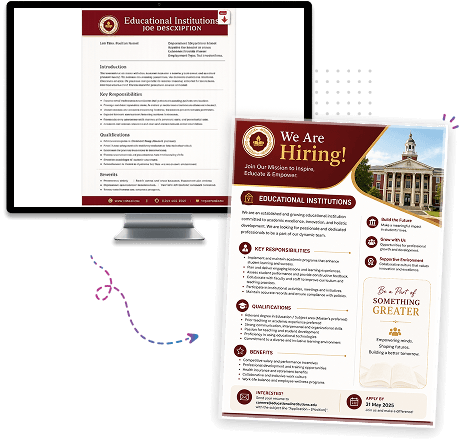
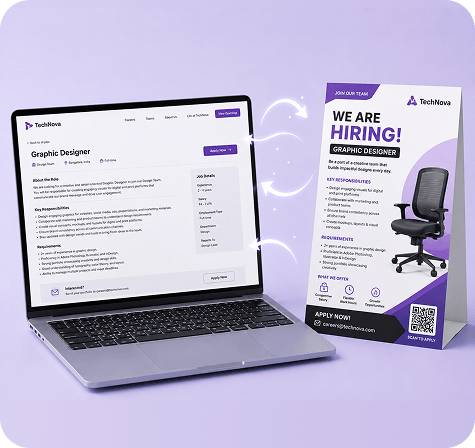
Job description to hiring flyer mockup

Create a Hiring Flyer from Your Job Description in 4 Simple Steps

Finding great talent starts with getting your job opening in front of the right candidates. Upload your Job Description (JD), and AI automatically transforms your hiring information into a professional recruitment flyer.

1. Upload Your Job Description

Upload your Job Description in PDF, DOC, or TXT format.

2. AI Extracts Hiring Information

The system analyzes your JD and identifies important hiring details such as the job title, company information, responsibilities, qualifications, skills, location, salary, and application details.

3. Generate Your Hiring Flyer

AI automatically organizes your hiring information into a professional flyer designed to attract qualified candidates.

4. Download & Publish

Download your hiring flyer in high quality and publish it on job boards, social media, company websites, email campaigns, career fairs, or print recruitment materials.

technova-graphic-designer-job-hiring-website-flyer-mockup

Why Use a JD to Hiring Flyer Generator?

Hiring teams already spend significant time preparing detailed job descriptions. Creating a separate hiring flyer often means rewriting content, selecting important information, and designing promotional materials from scratch.
A JD to Hiring Flyer Generator simplifies this process by converting your existing Job Description into a professional recruitment flyer. Instead of manually rebuilding your hiring content, simply upload your JD and let AI organize your hiring information into a visually engaging flyer that helps promote open positions across digital and print channels.
Whether you're hiring for a single role or recruiting at scale, you can quickly create professional hiring flyers while keeping your job information accurate and consistent.

Automatically Extract Hiring Information

AI analyzes your Job Description and identifies the key information needed to build a professional hiring flyer automatically.

Job Title

Use the job title as the primary headline of your hiring flyer.

Company Name

Display your company or organization to strengthen employer branding.

Job Summary

Highlight the purpose of the role with a concise overview.

Key Responsibilities

Present the primary duties and day-to-day responsibilities of the position.

Required Skills

Showcase the technical and professional skills candidates should possess.

Qualifications

Include educational requirements, certifications, or experience needed for the role.

Employment Type

Display whether the position is full-time, part-time, contract, internship, or temporary.

Job Location

Help candidates understand where the position is based or whether remote work is available.

Salary Information

Include compensation details whenever they are available within the Job Description.

Application Details

Highlight important application instructions, deadlines, or contact information available in the JD.

See Hiring Flyers Created from Real Job Descriptions

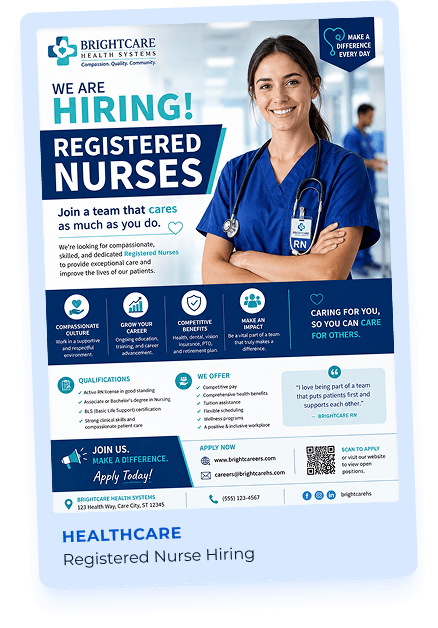
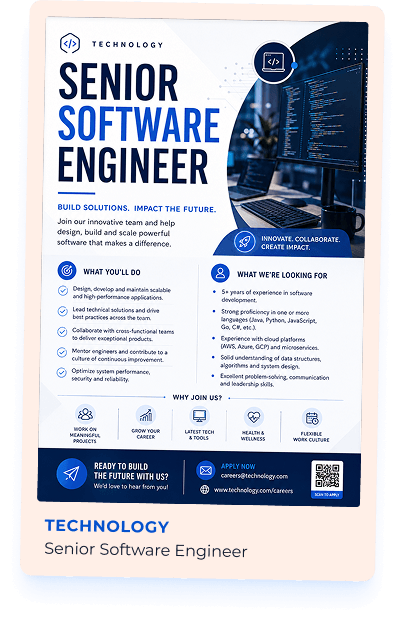
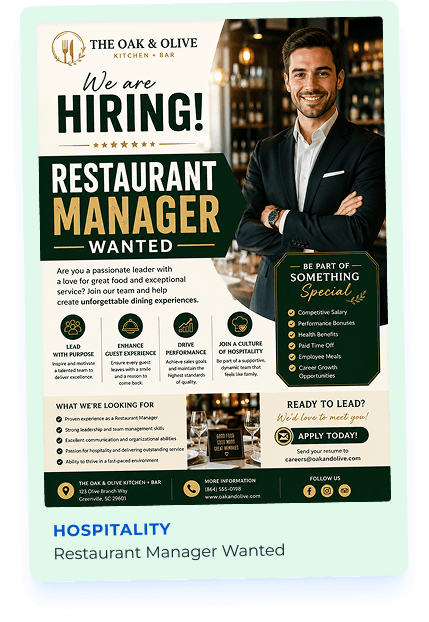
Explore professionally designed hiring flyer examples generated from real Job Descriptions across different industries. Each flyer is automatically created using hiring information extracted from the uploaded JD, helping businesses promote open positions quickly and professionally.

Healthcare hiring flyer example Technology hiring flyer example Hospitality hiring flyer example

Perfect for Businesses Hiring New Talent

Whether you're hiring one employee or recruiting for multiple positions, generating hiring flyers directly from your Job Description helps simplify your recruitment process.

Human Resource Teams Recruiters Staffing Agencies Startups Small Businesses Large Enterprises Manufacturing Companies Retail Businesses Healthcare Organizations Educational Institutions Restaurants & Hospitality Businesses IT & Software Companies

Why Generate Hiring Flyers with DesignWiz?

Create professional hiring flyers directly from your existing Job Descriptions. AI extracts your recruitment information and generates hiring-ready flyer designs, helping you attract qualified candidates faster across digital and offline recruitment channels.

Automatic Job Description Extraction

Generate hiring flyers using information already available in your JD.

No Manual Content Copying

Upload your Job Description and let AI organize your hiring information automatically.

Professional Hiring Flyer Layouts

Generate clean, attractive flyers designed specifically for recruitment campaigns.

Supports Standard Job Description Files

Upload PDF, DOC, or TXT Job Description files with ease.

Fast Hiring Flyer Generation

Create recruitment marketing materials within minutes instead of designing from scratch.

High-Quality Downloads

Download hiring flyers suitable for online recruitment and professional printing.

Ready to Publish

Share your hiring flyers on LinkedIn, company career pages, job boards, social media, email campaigns, recruitment events, or print them for offline hiring.

Built for Recruitment Campaigns

Perfect for job openings, walk-in interviews, campus hiring, mass recruitment, seasonal hiring, and urgent vacancies.

We can’t create this design as it violates our content policy.

freshchat icon chat icon loading icon

Frequently Asked Questions (FAQs)

A JD to Hiring Flyer Generator automatically converts your Job Description into a professionally designed hiring flyer using AI.
Upload your Job Description in PDF, DOC, or TXT format and click Generate Flyer. AI analyzes your JD and creates a professional hiring flyer using your recruitment information.
The generator can extract details such as the job title, company name, job summary, responsibilities, required skills, qualifications, employment type, location, salary information, and application details available in your JD.
You can upload Job Descriptions in PDF, DOC, or TXT format.
No. AI automatically generates a professional hiring flyer using the information available in your Job Description.
Yes. You can generate additional hiring flyers from the same Job Description whenever you want to explore different flyer designs.
No. The generator only reads the information contained in your uploaded Job Description to create your hiring flyer. Your original file remains unchanged.
You can publish your hiring flyer on LinkedIn, company career pages, job boards, social media platforms, email campaigns, recruitment events, or print it for offline hiring.