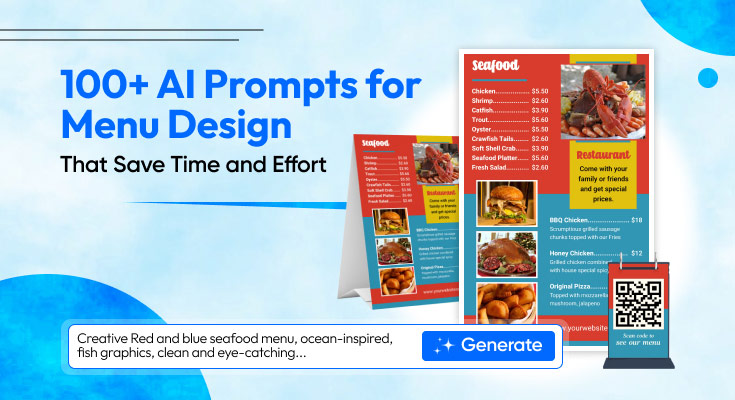
Designing a menu from scratch is harder than it looks. You need to organize categories, write mouth-watering descriptions, choose the right layout, and make every item sound worth ordering. Most food business owners spend hours on this, and still aren’t satisfied with the results.
That’s where AI menu prompts come in. With the right prompts, you can use the DesignWiz AI Menu generator tool to generate menu layouts, item descriptions, pricing structures, typography suggestions, and even color themes in minutes. Whether you run a cozy café, a fine-dining restaurant, or a fast-food outlet, AI prompts for menu creation dramatically reduce your design time.
This guide gives you 100+ copy-paste-ready AI design prompts for menus, organized by category, plus tips on how to use them effectively and customize the results for your brand.
How to Use AI Prompts for Menu Design Effectively
Getting great results from AI menu design prompts isn’t just about copy-pasting. Here’s how to make every prompt work harder for you.
1. Be Specific About Your Context
Always include your restaurant type, cuisine, target audience, and brand tone. A prompt like “design a menu” will give generic results. A prompt like “design a rustic Italian trattoria menu for families, warm earthy tones, handwritten font style” gives you something immediately usable.
2. Iterate in Rounds
Start with broad prompts to explore concepts, then refine with follow-up prompts. Ask for variations, request changes in tone or layout, or ask the AI to make descriptions shorter or more premium-sounding.
3. Combine Prompt Categories
Mix prompts from different sections of this guide. Use a layout prompt, then a description prompt, then a color prompt, and stitch the outputs into a single cohesive menu direction.
4. Always Edit the Output
AI-generated menus give you a strong starting point, but always review and personalize. Add your real prices, remove items that don’t fit, and make sure descriptions match your kitchen’s actual output.
AI Prompts for Restaurant Menu Layout Ideas
Use these prompts to generate structural layout concepts for your menu, whether it’s a printed booklet, a chalkboard, or a digital screen.
“Generate a single-page restaurant menu layout for a modern Italian bistro. Include sections for appetizers, mains, pastas, desserts, and drinks. Use a clean two-column grid.”
“Design a trifold menu layout for a casual American diner. Include breakfast, lunch, and dinner sections. Suggest font pairings and section divider styles.”
“Create a one-page digital menu layout for a food truck. Prioritize readability on mobile screens. Keep it minimal with 3 to 4 category sections.”
“Suggest 5 different visual hierarchy approaches for a fine dining menu. Include ideas for white space usage, section headings, and item spacing.”
“Design a menu board layout for a burger joint with 12 items. Use a grid-based structure with images, item names, short descriptions, and pricing.”
“Create a split-panel menu layout for a café, one side for food, one side for drinks. Suggest a warm color palette and serif font style.”
“Generate a scrollable digital menu layout for a QR code-based restaurant system. Include category anchors at the top for quick navigation.”
“Design a two-page printed menu for a gastropub. Left page for food, right page for craft beers and cocktails. Suggest a dark, industrial aesthetic.”
“Create a menu layout for a children’s restaurant. Use large fonts, illustrated section headers, and a colorful grid structure.”
“Suggest a one-panel takeaway menu layout for a Thai street food stall. Include sections for starters, mains, and drinks. Keep it bold and easy to scan.”
AI Prompts for Food Item Descriptions
Great menu descriptions increase perceived value and drive higher order sizes. These prompts help you write copy that sells.
“Write a mouth-watering description for a slow-cooked beef brisket served with smoked barbecue sauce, coleslaw, and brioche bun. Keep it under 25 words.”
“Rewrite the following item description in a more premium, upscale tone: [paste your original description here].”
“Generate short, punchy descriptions (under 20 words each) for 8 classic pizza variations at a wood-fired pizzeria.”
“Write descriptions for 5 vegan breakfast items that sound exciting and filling, not just healthy. Avoid words like ‘guilt-free’ or ‘clean eating.'”
“Create sensory-rich descriptions for 6 cocktails at a rooftop bar. Use taste, texture, and aroma cues in each.”
“Write item descriptions for a school canteen menu targeting teenagers. Keep the tone fun, casual, and relatable.”
“Rewrite this menu section using power words that create urgency and desire: [paste section here].”
“Generate 10 dessert descriptions that make the reader feel indulgent and treat-worthy. Target a premium patisserie audience.”
“Write descriptions for 6 seasonal dishes using ingredient-forward language. Highlight freshness and local sourcing.”
“Create one-liner dish descriptions for a minimalist fine dining menu. Each should be evocative, under 12 words, and avoid clichés.”
AI Prompts for Menu Typography & Styling
Typography is one of the most overlooked elements of menu design. These prompts help you find the right font personality for your brand.
“Suggest 5 font pairings for a rustic farmhouse café menu. Include one for headings and one for body text. Describe the mood each pairing creates.”
“What font styles work best for a luxury fine dining menu? Give 3 recommendations with reasons.”
“Suggest typography guidelines for a neon-themed street food menu. Include font size recommendations for headings, item names, and descriptions.”
“How should I format text hierarchy on a restaurant menu? Give a clear structure for title, section heading, item name, description, and price.”
“Recommend a font and text layout approach for a multilingual menu (English + Hindi). Ensure readability across both scripts.”
“Create a complete typography style guide for a modern sushi restaurant menu. Include font names, sizes, weights, and letter spacing for each element.”
“Suggest a bold, expressive display font for a Mexican street taco menu. Describe the vibe and how to pair it with a body font.”
“What is the minimum readable font size for a printed restaurant menu? Give recommendations by element type.”
AI Prompts for Pricing Structure Optimization
How you display pricing directly affects how customers perceive value. Use these prompts to optimize your pricing layout and reduce ordering hesitation.
“Suggest the best way to display pricing on a restaurant menu to reduce price sensitivity. Should I use currency symbols, remove decimal points, or align prices differently?”
“Generate a pricing structure suggestion for a 3-tier menu (budget, standard, premium) for a family-friendly pizza restaurant.”
“How should I present combo pricing on a fast food menu board? Give 3 layout approaches with pros and cons for each.”
“Redesign this menu pricing section to make it clearer and easier to scan: [paste your pricing section].”
“What are the most effective menu pricing psychology strategies? List 5 with practical examples for a casual dining restaurant.”
“Help me rewrite the pricing labels on my café menu so they feel more approachable for first-time visitors.”
“Should I display prices with or without currency symbols on a fine dining menu? Explain the psychology behind each approach.”
“Create a pricing layout recommendation for a menu with both à la carte and set-menu options on the same page.”
AI Prompts for Color Themes and Branding
Color affects appetite, mood, and brand recall. These prompts help you build a visually consistent menu that matches your identity.
“Suggest a full color palette for a health-focused smoothie bar menu. Include primary, secondary, and accent colors with hex codes.”
“What color combinations work best for a spicy street food brand? Include background, text, and highlight colors.”
“Create a dark-mode color scheme for a premium steakhouse digital menu. Prioritize contrast and readability.”
“Suggest 3 different color theme options for a coastal seafood restaurant menu. Include the emotional association of each palette.”
“Design a brand color guide for a new bakery. Include menu background, font color, and accent color, all cohesive and warm.”
“How do I use color to highlight bestselling items on my menu without making the layout look cluttered?”
“Generate a color palette for a Japanese ramen bar. Should feel warm, minimalist, and authentic. Include usage rules for each color.”
“What colors should I avoid on a food menu and why? Give a practical list with design reasoning.”
AI Prompts for Digital Menu Creation
Digital menus, whether on screens, tablets, or QR codes, have unique design needs. These digital menu prompts ensure your menu works beautifully on any device.
“Create a digital menu design brief for a QR code-based system. Include layout structure, font sizes for mobile, image placement, and CTA text.”
“How should a digital menu differ from a printed menu in terms of layout and typography? List 5 key differences.”
“Generate a section-by-section content structure for a digital menu landing page with ordering capability. Include UX best practices.”
“Suggest how to organize a large digital menu (50+ items) so customers do not feel overwhelmed. Include filtering and categorization strategies.”
“Write a homepage introduction message for a restaurant’s digital menu, welcoming, branded, and encouraging the customer to explore.”
“Create accessibility guidelines for a digital menu designed to serve elderly and visually impaired customers.”
“Suggest a loading speed optimization strategy for an image-heavy digital menu on mobile.”
“How should I handle menu updates (daily specials, sold-out items) in a digital menu system?”
AI Prompts for Café & Bakery Menu Designs
Cafés and bakeries have distinct visual identities. These menu generation prompts are tailored for warm, inviting food spaces.
“Design a café menu concept for a cozy Parisian-style coffee shop. Include sections for espresso drinks, teas, pastries, and light bites.”
“Create a seasonal spring menu for a bakery. Include 5 limited-edition items, each with a creative name and description.”
“Write a menu structure for a bubble tea café targeting teens and young adults. Use playful language and bold color recommendations.”
“Suggest how to organize a menu board for a high-volume café with 40+ items. Prioritize speed of decision for customers in queues.”
“Generate a pricing and item layout for a bakery display case menu. Include sections for breads, cakes, cookies, and savoury items.”
“Create a morning vs. afternoon menu split for a café. Suggest how to visually differentiate the two dayparts on one menu board.”
“Write 8 coffee drink descriptions for a specialty café that appeal to both enthusiasts and casual drinkers.”
“Create a vintage-inspired café and bakery menu featuring coffee, breads, and desserts with warm tones and classic serif typography for a cozy feel.”
AI Prompts for Fine Dining Menu Concepts
Fine dining menus are a statement of luxury and experience. These prompts focus on elegance, restraint, and storytelling.
“Create a tasting menu concept for a modern European fine dining restaurant. Include 7 courses with evocative names and one-line descriptions.”
“Write a wine pairing suggestion section for a 5-course fine dining menu. Keep the tone knowledgeable but not intimidating.”
“Generate a front cover text concept for a luxury restaurant menu. Include tagline ideas and a brand philosophy statement.”
“Suggest a minimalist layout approach for a fine dining à la carte menu. Prioritize white space, elegant typography, and subtle textures.”
“Rewrite these fine dining item descriptions so they feel more poetic and premium: [paste items here].”
“Design a chef’s note page for a fine dining menu. Tell the story of the cuisine’s inspiration in under 80 words.”
“Suggest how to present dietary and allergen information on a fine dining menu without disrupting the luxury aesthetic.”
“Create a luxury fine dining menu concept with elegant course descriptions, refined typography, and a minimalist layout that emphasizes sophistication and storytelling.”
AI Prompts for Fast Food & Street Food Menus
Speed, clarity, and bold visuals define fast food menu design. These prompts are built for high-impact, easy-to-read formats.
“Design a menu board layout for a gourmet burger stand with 8 burgers, 4 sides, and 3 drinks. Make it bold and easy to read from 5 feet away.”
“Suggest a naming convention for a street taco menu. Items should be punchy, memorable, and under 3 words each.”
“Write 10 fast food item descriptions using energetic, appetite-triggering language. Each under 15 words.”
“Create a combo meal layout for a fried chicken fast food chain. Include 5 meal deals with pricing and upsell options.”
“How should I structure a limited menu for a food truck to maximize sales and minimize decision fatigue?”
“Suggest a color and typography scheme for a Korean street food brand. It should feel bold, modern, and urban.”
“Write names and taglines for 6 signature burgers at a new gourmet fast food brand.”
“Design a bold street food menu for a loaded fries concept with eye-catching colors, large item names, and a quick-scan layout optimized for fast ordering.”
AI Prompts for Seasonal & Special Menus
Limited-time menus create urgency and excitement. These prompts help you design specials that feel fresh and exclusive.
“Create a Valentine’s Day set menu concept for a romantic restaurant. Include 3 courses, romantic dish names, and a wine pairing.”
“Generate a Ramadan iftar buffet menu structure with traditional and fusion dishes. Include section headings and layout.”
“Design a Christmas menu insert for a family restaurant. Include festive language, 4 main dishes, and 2 desserts. Suggest a red and gold color theme.”
“Create a summer BBQ outdoor menu for a gastropub. Include drinks, grills, sides, and a featured cocktail. Keep the tone relaxed and fun.”
“Write a limited-edition autumn menu for a café. Use seasonal ingredients and include creative item names that evoke warmth.”
“Design a New Year’s Eve set menu for a fine dining restaurant. Include 4 courses and champagne pairing notes.”
“Create a back-to-school lunch menu for a family café. Include 5 quick, affordable meal options with fun names for kids.”
“Create a limited-time monsoon special menu for a café featuring cozy comfort foods and hot beverages with warm tones and inviting descriptions.”
AI Prompts for Improving Customer Experience Design
Great menu design isn’t just visual; it shapes how customers feel and makes decisions. These prompts focus on the experience layer.
“How can I use visual hierarchy on my menu to guide customers toward high-margin items without it feeling pushy?”
“Suggest 5 ways to improve the customer experience of a busy restaurant’s printed menu. Focus on layout, language, and decision flow.”
“Create a simple call-to-action strategy for a digital menu to increase average order value. Include upsell and cross-sell prompts.”
“How should a restaurant menu communicate allergen and dietary information clearly without cluttering the design?”
“Rewrite this menu intro paragraph to feel warmer and aligned with a family-friendly brand tone: [paste text].”
“What are the most common customer pain points when reading a restaurant menu? List 6 with design fixes.”
“Design a ‘staff picks’ section for a café menu. Suggest how to present it visually and what copy to include.”
“Suggest a menu layout strategy that reduces decision fatigue while subtly highlighting bestsellers using clear sections, icons, and smart placement.”
Copy-Paste Ready AI Prompt List (Grouped)
How to Customize AI-Generated Menus
Once you have your AI-generated content, customization turns a generic output into something uniquely yours. Here’s a quick workflow:
- Review the structure. Does the section order match how your customers think about your food?
- Replace generic item names with your real menu items and actual prices.
- Edit descriptions to reflect your kitchen’s actual cooking style and ingredients.
- Apply your brand colors and fonts to the suggested layout.
- Test print or preview the digital version and get feedback from 2–3 customers or team members.
- Iterate, use follow-up AI prompts to refine sections that feel off.
A small food business that tried this approach, starting with an AI-generated layout, refining descriptions with follow-up prompts, and applying brand colors, cut their menu redesign time from two weeks to two days. That’s the real power of using AI prompts for menu creation strategically.
Benefits of Using AI Prompts in Menu Creation
Before diving into the prompts, it’s worth understanding why AI design prompts for menus are quickly becoming a go-to tool for food businesses of all sizes.
- Save hours of design and copywriting time
- Generate multiple layouts and concept ideas instantly
- Improve food item descriptions to boost perceived value
- Get consistent branding suggestions across your entire menu
- Reduce the cost of freelance designers for early drafts
- Easily adapt your menu for seasonal changes or new items
A café owner redesigning their board for the first time, for example, can use AI prompts to get 10 layout ideas, 5 color palettes, and 20 item descriptions, all in under an hour. That’s the kind of efficiency that used to require an entire design team.
Frequently Asked Questions
AI can generate the content, structure, and styling guidance for a full menu, including sections, descriptions, and color themes. However, you’ll still need to apply the output in a design tool and customize it for your real items, prices, and brand. Think of AI as a very fast creative assistant, not an autonomous designer.
Include your restaurant type, cuisine, target audience, desired mood or tone, and any specific requirements. For example: “Design a brunch menu for a modern Australian café. Include 5 breakfast items, 4 lunch mains, and a drinks section. Use a clean, minimal layout with warm tones and a handwritten accent font.”
No. AI design prompts for menus are especially useful for beginners with no design background. You can generate professional-quality ideas and copy without any prior experience. The prompts in this guide are beginner-friendly and immediately actionable.
Most effective menu design workflows use 5 to 15 prompts across different categories, a layout prompt, a few description prompts, a typography prompt, and a color prompt. Start broad, then refine. You don’t need to use all 100+ prompts; pick the ones most relevant to your current challenge.
Yes. The prompts in this guide are tool-agnostic and written in plain language. They’re designed to produce useful, structured responses regardless of which AI platform you’re using.
Final Thoughts
Designing a menu no longer requires weeks of effort or a professional designer. With the right AI prompts, you can quickly generate creative layouts, compelling descriptions, smart pricing, and cohesive color themes. This guide’s 100+ prompts cover everything from menu structure and food copy to digital UX and seasonal ideas, helping you create a polished, professional menu in less time.
Use prompts strategically: be specific, refine in steps, and tailor results to your brand. AI can handle the heavy lifting, but your unique voice brings the menu to life. Whether you’re starting fresh or redesigning, these prompts give you a strong, creative advantage.
Related Posts