freshchat icon chat icon loading icon

Share this template anywhere.

summer spikeball event flyer beach volleyball competition austin june 24 template

Spikeball Flyer Templates

DesignWiz Spikeball Flyer Templates help tournament directors, recreation coordinators, and club organizers promote spikeball events, leagues, and tournaments with ready made layouts that are easy to customize for any roundnet competition or community gathering.
Thank you! This apps really useful.. I don't need anything else to make flyer or poster for my online store.. 😍 — Putri Dhamira Sucipto
4.6/5 (From 380k reviews)

Create your own

{"241149":{"name":"summer-spikeball-tournament-event-flyer-template-ziw9s9ce0486ff.jpg","webp_name":"summer-spikeball-tournament-event-flyer-template-ziw9s9ce0486ff.webp","width":325,"height":400}} 241149
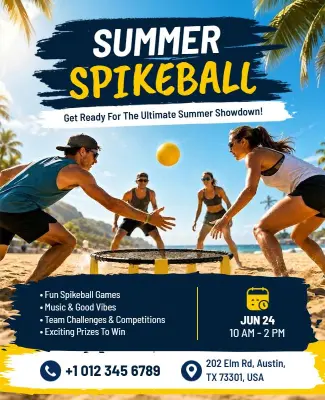
Summer Spikeball Tournament Event Flyer Template
325 x 400 px

summer
spikeball
Show all keywords
Summer Spikeball Tournament Event Flyer Template
{"56327":{"name":"spikeball-regional-event-flyer-template-yjh2xcc6d42886.jpg","webp_name":"spikeball-regional-event-flyer-template-yjh2xcc6d42886.webp","width":325,"height":400}} 56327
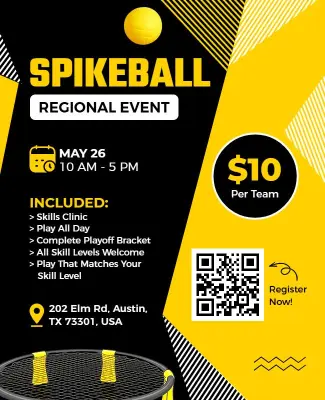
Spikeball Regional Event Flyer Template
325 x 400 px

spikeball
event
Show all keywords
Spikeball Regional Event Flyer Template
{"427876":{"name":"spikeball-activity-event-flyer-template-d46z59c0d268d5.jpg","webp_name":"spikeball-activity-event-flyer-template-d46z59c0d268d5.webp","width":325,"height":400}} 427876
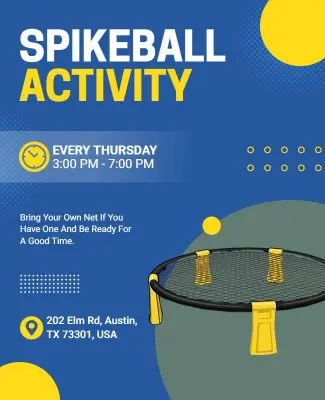
Spikeball Activity Event Flyer Template
325 x 400 px

spikeball
activity
Show all keywords
Spikeball Activity Event Flyer Template
{"441029":{"name":"spikeball-tournament-event-flyer-template-5xtd60b8ef6c18.jpg","webp_name":"spikeball-tournament-event-flyer-template-5xtd60b8ef6c18.webp","width":325,"height":400}} 441029
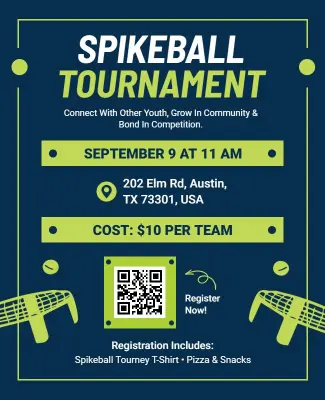
Spikeball Tournament Event Flyer Template
325 x 400 px

spikeball
flyer
Show all keywords
Spikeball Tournament Event Flyer Template
{"985006":{"name":"spikeball-league-event-flyer-template-pp20obb2b5f879.jpg","webp_name":"spikeball-league-event-flyer-template-pp20obb2b5f879.webp","width":325,"height":400}} 985006
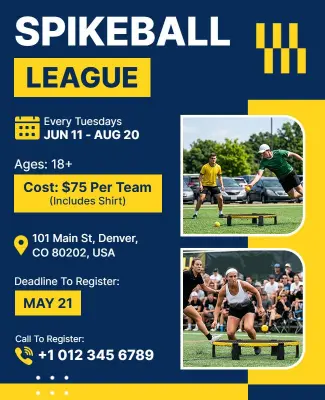
Spikeball League Event Flyer Template
325 x 400 px

spikeball
league
Show all keywords
Spikeball League Event Flyer Template

How to customize a spikeball flyer

No design skills needed. Choose a tournament or league layout, add your event details and registration info, adjust colors to match your vibe, then export a print ready flyer in minutes.

Corporate Growth Poster
1.

1. Pick a layout

Choose a spikeball flyer layout that matches your event format, whether it is a tournament, league season, or regional competition. Set flyer size to standard print or digital dimensions first.

2.

2. Add event details

Add event name, date, venue address, division brackets, entry fee, registration link or QR code, and prize details. Keep the headline prominent and event details scannable at a glance.

3.

3. Use action photos

Select high resolution spikeball action photos captured with a fast shutter speed to show players mid swing. Use clean backgrounds so the movement and energy of the sport stand out clearly.

4.

4. Apply colors and fonts

Apply athletic bold colors such as neon yellow, electric blue, or vibrant orange across backgrounds and headlines. Use bold condensed fonts for the event name and clean sans-serif for body text.

5.

5. Export for print and digital

Export print files at 300 DPI CMYK with 3mm bleed and crop marks for professional print results. Export a separate RGB digital version for social media to promote your spikeball event.

Trusted by Thousands

Tata Consultancy Services
Boston Consulting
AT&T
Avelo Airlines
Procter & Gamble
Ministry Of Health, Malaysia
Veterans Affairs
Detroit Government
New York University
Texas A&M University
Decathlon America
Warby Parker
Tata Consultancy Services
Boston Consulting
AT&T
Avelo Airlines
Procter & Gamble
Ministry Of Health, Malaysia
Veterans Affairs
Detroit Government
New York University
Texas A&M University
Decathlon America
Warby Parker
High performer asia
Front runners
High performer small business

Other Flyer templates

Spikeball Flyer Templates Design Ideas and Examples

Customize colors, photos, division details, and registration info to match your event, then keep the layout clear so players and spectators can spot the essentials quickly. DesignWiz offers spikeball flyers across tournament formats, league promotions, activity events, and regional competitions, so you can start from a ready made layout and edit it for your roundnet event. Use these ideas to decide headline style, content placement, and what to emphasize for your participants, then browse flyer templates when you want more options beyond your first pick.

Tournament and competition flyers

Lead with the event name and date, list divisions and skill brackets, and include registration link, entry fee, and prize details. Add a map or venue name and a contact line for questions. For a roundnet competition, start from spikeball tournament event flyer template and swap the event name, division details, and registration link.

League and season promotion flyers

Feature the league name and season dates, include format details such as doubles or coed, and list weekly schedule and location. Add a sign up now call to action with a link and deadline. For a league promotion, adapt spikeball league event flyer template and update the season dates, format rules, and registration deadline.

Summer and outdoor event flyers

Use bright seasonal colors and action imagery to capture the outdoor feel, highlight the location and time, and include what to bring such as water, sunscreen, and your own net. Add a call to action for team sign ups and spectator info. For a summer event, customize summer spikeball tournament event flyer template and replace the date, location details, and bring list.

Create Your Flyer Template Now!

Frequently Asked Questions (FAQs)

Every spikeball tournament flyer needs the event name and date, venue with full address, registration link or QR code, entry fee, and contact information. Add division options such as advanced, intermediate, beginner, coed, and women so teams know which bracket fits. Include prize details, schedule highlights such as check in time and bracket start, and any age or equipment requirements. Keep the text organized so players can find registration details immediately without searching. Use bold typography for the event name and clean fonts for supporting information.

Standard sizes for spikeball tournament flyers include 8.5x11 inches for bulletin boards, community center postings, and college campus distribution, and 5.5x8.5 inches for handouts at recreation centers and gyms. For digital promotion on social media, use 1080x1350 pixels for Instagram feed posts and 1200x628 pixels for Facebook event pages. Export print files at 300 DPI with 3mm bleed on all sides. Keep critical event details at least 5mm inside the trim line to prevent information loss during cutting.

Use bold sporty colors that match the energy of spikeball such as neon yellow, electric blue, bright orange, and vibrant green. High contrast combinations like black text on neon backgrounds make event details pop on bulletin boards and social feeds. Limit the palette to two or three colors so the flyer looks professional and not cluttered. Incorporate spikeball brand colors when promoting official tour events to build recognition. Use warm tones for social community events and cooler tones for competitive tournament flyers.

Capture players mid swing or diving for the ball to show the fast paced nature of roundnet. Shoot at ground level or slightly above to show the net and player positioning clearly. Use a fast shutter speed to freeze motion and avoid blur. Include both wide shots showing the full court and close ups of serves or spikes. Use natural outdoor light for beach or park tournaments and bright indoor lighting for gym events. Edit images to enhance contrast and vibrance so photos pop on both print and digital flyers.

Yes, registration information is essential for any spikeball event flyer. Include the registration link or QR code, entry fee per team or player, registration deadline, and what is included such as a t shirt or post event meal. For multi division tournaments, list fees for each bracket separately. Add a register now call to action in a prominent position. For free community events, note that registration is required and include a link to a sign up form. Always test the QR code prints clearly at the target size before finalizing.

Use clear labels for each division such as beginner, intermediate, advanced, coed, and women and list them in a clean grid or table format. Assign a distinct color to each division so participants can quickly identify their bracket. Include brief eligibility notes such as years of experience or rating requirements so teams self select correctly. Add prize details per division for competitive brackets. Keep the design balanced so one division does not visually dominate the flyer unless it is the feature division for a premier event.

Use bold athletic sans-serif fonts like Barlow Condensed, Oswald, or Impact for headlines to convey energy and fast paced action. Pair with a clean readable sans-serif font like Roboto, Open Sans, or Lato for event details and registration information. Keep headlines at 48pt or larger and body text at minimum 18pt for readability on print and phone screens. Use bold weight for the event name and dates and regular weight for descriptions. Limit to two fonts per flyer to maintain a clean professional look.

Use a single bold headline that states the event name and date in five words or less so it is readable in a thumbnail. Make the registration link or QR code prominent. Use a bright accent color for the call to action button. Include an action photo of spikeball players as the hero image. Keep text minimal for social versions and include all supporting details in the caption. Export at platform recommended sizes. Add a countdown element or early bird pricing note to create urgency and drive faster registration.

Yes, but export two versions from the same base design. Export a print version at 300 DPI in CMYK with 3mm bleed and crop marks sized for standard letter or half letter. Export a digital version in RGB at 72 DPI sized for the target platform such as 1080x1350 pixels for Instagram or 1200x628 pixels for Facebook. Adjust headline size and spacing for the smaller digital format so the event name and date remain readable on phone screens. Keep branding consistent across both versions.

For a league flyer, focus on season dates, weekly schedule, team formation options, and a sign up deadline. Emphasize recurring play, skill development, and social community aspects. For a tournament flyer, emphasize the event date, competitive brackets, prize pool, and registration link. Use different tones welcoming and community focused for leagues, high energy and competitive for tournaments. Adjust the call to action accordingly sign up for a season vs register for the event. Use different color schemes to visually differentiate the two formats.
Start Designing with AI
Can’t find the perfect design? Create instantly with AI.