freshchat icon chat icon loading icon

Share this template anywhere.

vacation raffle flyer with beach destination options and ticket details template

Raffle Poster Templates

Raffle poster templates designed for fundraising events, school auctions, and community giveaways — 1,000+ organizers have used DesignWiz to build eye-catching displays in minutes.
Create your own

{"635866":{"name":"vacation-raffle-announcement-poster-template-89w0t0d5fcd17f.jpg","webp_name":"vacation-raffle-announcement-poster-template-89w0t0d5fcd17f.webp","width":325,"height":400}} 635866
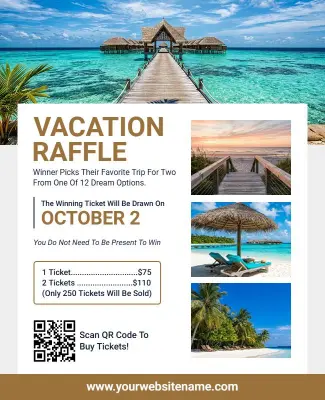
Vacation Raffle Announcement Poster Template
325 x 400 px

raffle
vacation
Show all keywords
Vacation Raffle Announcement Poster Template
{"340307":{"name":"green-ticket-themed-basket-raffle-event-poster-template-0ujzhz2ced8946.jpg","webp_name":"green-ticket-themed-basket-raffle-event-poster-template-0ujzhz2ced8946.webp","width":325,"height":400}} 340307
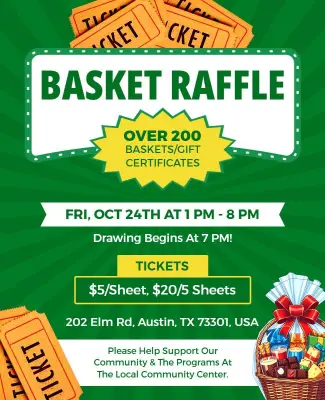
Green Ticket-Themed Basket Raffle Event Poster Template
325 x 400 px

raffle
basket
Show all keywords
Green Ticket-Themed Basket Raffle Event Poster Template
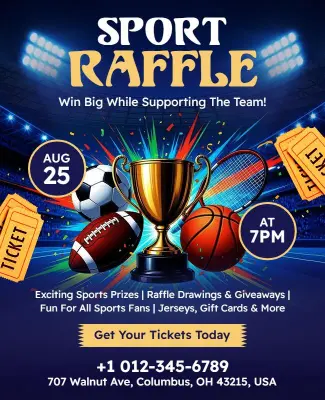
{"863457":{"name":"dynamic-sports-raffle-event-with-exciting-prizes-poster-template-rvyvjy02ec8806.jpg","webp_name":"dynamic-sports-raffle-event-with-exciting-prizes-poster-template-rvyvjy02ec8806.webp","width":325,"height":400}} 863457
Dynamic Sports Raffle Event with Exciting Prizes Poster Template
325 x 400 px

raffle
sport
Show all keywords
Dynamic Sports Raffle Event with Exciting Prizes Poster Template
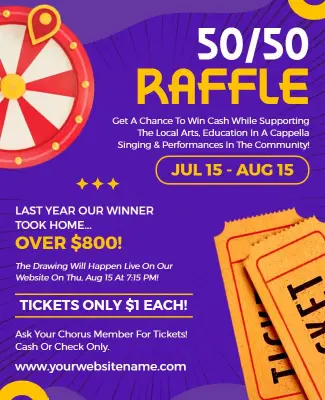
{"106620":{"name":"purple-and-yellow-community-5050-raffle-event-poster-template-jlghp5dd3bcd49.jpg","webp_name":"purple-and-yellow-community-5050-raffle-event-poster-template-jlghp5dd3bcd49.webp","width":325,"height":400}} 106620
Purple and Yellow Community 50/50 Raffle Event Poster Template
325 x 400 px

raffle
poster
Show all keywords
Purple and Yellow Community 50/50 Raffle Event Poster Template
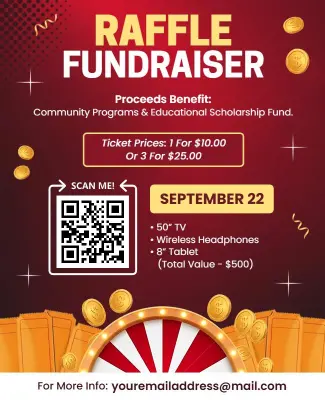
{"69917":{"name":"golden-carnival-theme-raffle-fundraiser-event-poster-template-fz2yyg80633e3d.jpg","webp_name":"golden-carnival-theme-raffle-fundraiser-event-poster-template-fz2yyg80633e3d.webp","width":325,"height":400}} 69917
Golden Carnival Theme Raffle Fundraiser Event Poster Template
325 x 400 px

raffle
fundraiser
Show all keywords
Golden Carnival Theme Raffle Fundraiser Event Poster Template
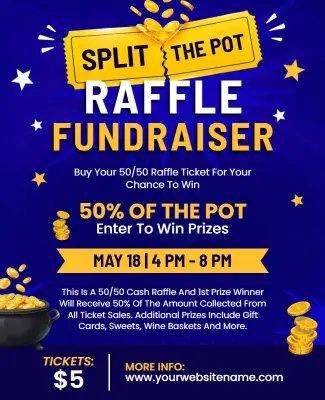
{"131440":{"name":"vibrant-split-the-pot-raffle-promotion-poster-template-iw4jk8859e56ab.jpg","webp_name":"vibrant-split-the-pot-raffle-promotion-poster-template-iw4jk8859e56ab.webp","width":325,"height":400}} 131440
Vibrant Split the Pot Raffle Promotion Poster Template
325 x 400 px

split
the
Show all keywords
Vibrant Split the Pot Raffle Promotion Poster Template
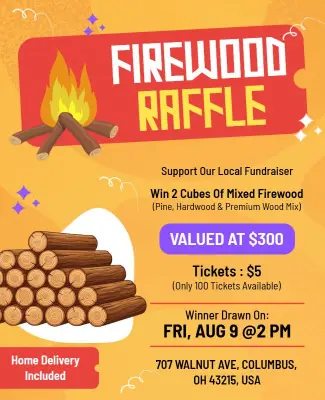
{"662669":{"name":"rustic-firewood-raffle-fundraiser-event-poster-template-wffpx6a35e54ca.jpg","webp_name":"rustic-firewood-raffle-fundraiser-event-poster-template-wffpx6a35e54ca.webp","width":325,"height":400}} 662669
Rustic Firewood Raffle Fundraiser Event Poster Template
325 x 400 px

raffle
firewood
Show all keywords
Rustic Firewood Raffle Fundraiser Event Poster Template

How to make a raffle poster

No design skills needed. Pick a bold layout, add your prize details, ticket price, and draw date, then download a print-shop-ready file in minutes.

Corporate Growth Poster
1.

1. Choose a layout

Choose a bold, visual-first layout with large prize imagery or headline space — minimal text works best for wall display at events and venues.

2.

2. Add your headline

Add your headline (prize name or event title), keeping it to 8 words or fewer so it reads clearly from across the room.

3.

3. Fill in ticket details

Fill in ticket price, draw date, and where to buy tickets — include a QR code if selling tickets online or through a link.

4.

4. Upload your logo

Upload your organization logo and adjust colors to match your group or event theme.

5.

5. Export for print

Export as a high-resolution PDF at 300dpi for a crisp, print-shop-ready poster.

Trusted by Thousands

Tata Consultancy Services
Boston Consulting
AT&T
Avelo Airlines
Procter & Gamble
Ministry Of Health, Malaysia
Veterans Affairs
Detroit Government
New York University
Texas A&M University
Decathlon America
Warby Parker
Tata Consultancy Services
Boston Consulting
AT&T
Avelo Airlines
Procter & Gamble
Ministry Of Health, Malaysia
Veterans Affairs
Detroit Government
New York University
Texas A&M University
Decathlon America
Warby Parker
High performer asia
Front runners
High performer small business

Other Poster templates

Who uses raffle poster templates?

Nonprofits, schools, sports clubs, and community organizations use raffle poster templates to attract attention at venues, bulletin boards, and event spaces. Most need a bold, large-format layout they can update with prize details, ticket prices, and a draw date — then print and hang the same day without hiring a designer.

Nonprofit fundraising coordinators — organize annual raffle drives for charities, food banks, and shelters. They add the grand prize, ticket price per entry, draw date, and a QR code for digital ticket purchases, then print the poster for lobby and window display. Use the Golden Carnival Theme Raffle Fundraiser Event Poster Template to get started.

PTA and school fundraiser organizers — run basket raffles and prize drawings to raise funds for school programs. They update the poster with each prize basket description, ticket cost, and event date, then hang it in school hallways and community centers ahead of the draw. Use the Green Ticket-Themed Basket Raffle Event Poster Template to get started.

Sports club booster groups — host equipment raffles and 50/50 draws to fund team travel and gear purchases. They add the prize description, ticket price, and draw date, then display the poster at game days and tournaments to drive ticket sales from attendees in the stands. Use the Dynamic Sports Raffle Event with Exciting Prizes Poster Template to get started.

Community event venues and social clubs — promote split-the-pot and vacation prize raffles at member events. They customize the poster with the jackpot amount, ticket pricing tiers, and draw time, then mount it near the entrance and bar area to maximize visibility during event night. Use the Vibrant Split the Pot Raffle Promotion Poster Template to get started.

Vacation raffle organizers — run travel prize draws to raise money for clubs, schools, or community programs. They add the destination, prize value, ticket price, and draw date, then post the poster at local businesses and community noticeboards to reach a wide pool of ticket buyers. Use the Vacation Raffle Announcement Poster Template to get started.

Local fire departments and volunteer groups — sell firewood or seasonal goods raffles as a low-effort fundraiser. They customize the poster with bundle description, price per ticket, and pickup or delivery details, then post it at the firehouse, local stores, and community bulletin boards. Use the Rustic Firewood Raffle Fundraiser Event Poster Template to get started.

Over 1,089 organizations and volunteers have used DesignWiz to create raffle posters.

Free vs paid — what's included

Free plan

Access to raffle poster templates

Full customization — text, colors, images, layout

Download as PNG or JPG

DesignWiz watermark on export

Requires a free account to download

Paid plan — under 5 dollars per month

Everything in the free plan

Watermark removed from all downloads

PDF (300 DPI) export for print-shop-ready files

For most community raffles and school fundraisers, the free plan is completely sufficient. Upgrade to paid if a print shop or event venue requires a clean, watermark-free PDF.

Create Your Poster Template Now!

Frequently Asked Questions (FAQs)

Every raffle poster needs five core details: the prize or prizes being offered, the ticket price, where and how to buy tickets, the draw date, and a contact or organizer name. For community events, adding a short sentence about the cause helps motivate buyers. If selling tickets online, include a QR code or short URL. Keep text minimal — a raffle poster is a display piece, not a flyer. Bold the prize and draw date so they read first from a distance.

A strong raffle poster leads with the prize — that is what motivates people to buy tickets. Use a large, bold headline (8 words or fewer) with the prize name or estimated value front and center. Choose high-contrast colors so the poster reads clearly from 10 feet away. Keep supporting details (ticket price, draw date, where to buy) in secondary text below. Avoid cluttering the poster with paragraphs — every line competes for attention, and a wall display must communicate instantly.

Lead with the prize value and make it impossible to miss. Buyers need to feel the reward is worth the ticket price in the first second they see the poster. Add urgency with the draw date and a ticket limit if applicable. Use bold, readable fonts and keep the layout uncluttered. Place the poster at eye level in high-traffic areas — entrances, registration tables, and bar areas at events. Include a QR code or short URL so interested buyers can act immediately.

Popular raffle formats that work well on posters include: vacation trip giveaways, 50/50 cash splits, basket raffles organized by theme (sports, spa, food), and seasonal goods like firewood bundles. For nonprofits, pairing the prize with a short mission statement on the poster reminds buyers why they are contributing. For school events, colorful designs attract family attention. Sports teams often use team colors and action imagery. Match your poster style to the audience and venue where you plan to display it.

Start with a bright, welcoming design that appeals to both parents and students. Include the school name and event name at the top, followed by the prize or prizes, ticket price, and the draw date. If the raffle benefits a specific program (like a school trip or library fund), mention it clearly — parents are more likely to buy when they know where the money goes. Keep the poster to one clear visual and two or three lines of supporting text. Print at 18 by 24 inches for hallway display.

Use a bold background color that contrasts with the venue walls — bright red, deep blue, or gold. Place the prize name in the largest font on the poster and keep everything else secondary. Avoid white backgrounds, which disappear against light-colored walls. Mount the poster at eye level near ticket sales and entry points. If your event has multiple posters competing for attention, a focused single-prize design with one striking visual outperforms a cluttered multi-prize layout every time.

The most effective raffle posters use four key elements: a large headline stating the prize, a supporting line with ticket price and draw date, one strong background image or color block, and a clear call to action (buy tickets here, scan QR code, or table number). Fonts should be bold and sans-serif for readability at distance. Avoid more than two font styles on one poster. If including a logo, keep it small — the prize is the hero, not the brand.

For wall display at event venues or community spaces, 18 by 24 inches is the standard raffle poster size and fits most print shop offerings. For storefront windows and lobby displays, 24 by 36 inches provides better visibility. If your venue is small or you are hanging multiple posters, A1 size (23.4 by 33.1 inches) is a good international standard. Always export as a PDF at 300dpi to ensure sharp print quality. For digital sharing on social media, a 1080 by 1350 pixel PNG works well.

Yes. Raffle poster templates are built for non-designers — every element is pre-positioned and the layout is already optimized for display at a distance. Click any text field to update the prize name, ticket price, draw date, or contact details. Use the color picker to change background or accent colors. Upload your organization logo or a prize image and reposition it by dragging. Most people complete a ready-to-print raffle poster in under 10 minutes with no prior design experience or skills needed.

Open the template in the editor and start with the prize information — this is the most important element and should be updated first. Replace the headline with your prize name or value, then update the ticket price, draw date, and where to purchase tickets. Swap the background color or image to match your event theme or organization colors. Add your logo if you have one. Once you are satisfied with the layout, download the file as a PDF for print or as a PNG for digital sharing.

DesignWiz offers free raffle poster templates through their web-based desktop platform. No design software is needed — templates open directly in a drag-and-drop editor. The free plan includes full customization of text, colors, images, and layout, with downloads available as PNG or JPG. A free account is required to download. Exported files include a DesignWiz watermark on the free plan. To remove the watermark and download a print-shop-ready PDF at 300dpi, upgrade to the paid plan for under 5 dollars per month.

DesignWiz offers raffle poster templates through a web-based desktop platform with a drag-and-drop editor — no software installation required. Templates come pre-designed for common raffle formats including fundraiser events, 50/50 draws, basket raffles, and vacation prize giveaways. Customize text, colors, and images directly in the browser. Download as PNG or JPG on the free plan, or export a watermark-free PDF at 300dpi on the paid plan. Create a free account to save and edit your designs at any time.

DesignWiz is a web-based desktop tool for creating raffle posters using ready-made templates or an AI generator. Templates are available for fundraiser raffles, sports club draws, school basket raffles, vacation prize giveaways, and community 50/50 events. The drag-and-drop editor requires no design skills — update text, swap colors, and upload logos in minutes. Export as PNG or JPG on the free plan, or as a watermark-free PDF at 300dpi on the paid plan. Start with a free account and customize a template in under 10 minutes.
Start Designing with AI
Can’t find the perfect design? Create instantly with AI.