freshchat icon chat icon loading icon

Share this template anywhere.

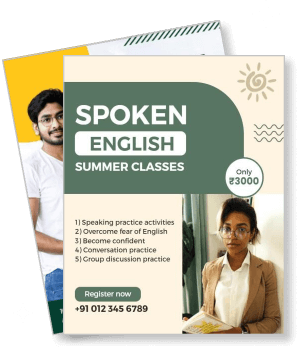
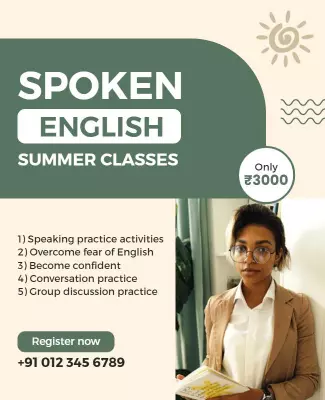
spoken english summer classes with pricing and contact details template

Coaching Poster Templates

DesignWiz coaching poster templates help tuition centers, training institutes, and private tutors promote their programs fast with ready-made layouts, plus simple editing for course details, batch timings, and contact information.

Create your own

{"287157":{"name":"modern-minimalist-online-coaching-home-class-poster-template-3tgz0vf449ed38.jpg","webp_name":"modern-minimalist-online-coaching-home-class-poster-template-3tgz0vf449ed38.webp","height":800,"width":650}} 287157
Modern Minimalist Online Coaching Home Class Poster Template
650 x 800 px

online
coaching
Show all keywords
Modern Minimalist Online Coaching Home Class Poster Template
{"818947":{"name":"vibrant-pink-educational-coaching-institute-poster-template-yptv8sf415380d.jpg","webp_name":"vibrant-pink-educational-coaching-institute-poster-template-yptv8sf415380d.webp","height":800,"width":650}} 818947
Vibrant Pink Educational Coaching Institute Poster Template
650 x 800 px

coaching
institute
Show all keywords
Vibrant Pink Educational Coaching Institute Poster Template
{"348953":{"name":"modern-blue-education-coaching-enrollment-poster-template-wjpo1jf40c2b70.jpg","webp_name":"modern-blue-education-coaching-enrollment-poster-template-wjpo1jf40c2b70.webp","height":800,"width":650}} 348953
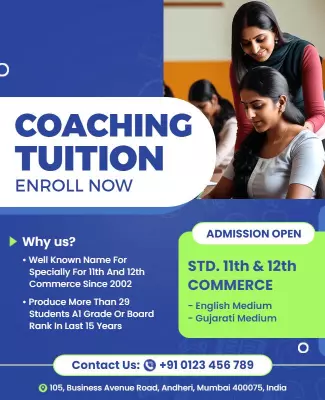
Modern Blue Education Coaching Enrollment Poster Template
650 x 800 px

coaching
tuition
Show all keywords
Modern Blue Education Coaching Enrollment Poster Template
{"407788":{"name":"modern-mint-green-spoken-english-summer-classes-poster-template-rjaatj20cf7e13.jpg","webp_name":"modern-mint-green-spoken-english-summer-classes-poster-template-rjaatj20cf7e13.webp","height":800,"width":650}} 407788
Modern Mint Green Spoken English Summer Classes Poster Template
650 x 800 px

spoken
english
Show all keywords
Modern Mint Green Spoken English Summer Classes Poster Template
{"863359":{"name":"engaging-spoken-english-classes-for-effective-communication-poster-template-64j7pgfcb2b75b.jpg","webp_name":"engaging-spoken-english-classes-for-effective-communication-poster-template-64j7pgfcb2b75b.webp","height":800,"width":650}} 863359
Engaging Spoken English Classes for Effective Communication Poster Template
650 x 800 px

spoken
english
Show all keywords
Engaging Spoken English Classes for Effective Communication Poster Template
{"846725":{"name":"vibrant-green-spoken-english-classes-learning-poster-template-gwpim221110ade.jpg","webp_name":"vibrant-green-spoken-english-classes-learning-poster-template-gwpim221110ade.webp","height":800,"width":650}} 846725
Vibrant Green Spoken English Classes Learning Poster Template
650 x 800 px

spoken
english
Show all keywords
Vibrant Green Spoken English Classes Learning Poster Template
{"105368":{"name":"vibrant-purple-spoken-english-grammar-classes-poster-template-dky40wfce7450c.jpg","webp_name":"vibrant-purple-spoken-english-grammar-classes-poster-template-dky40wfce7450c.webp","height":800,"width":650}} 105368
Vibrant Purple Spoken English Grammar Classes Poster Template
650 x 800 px

spoken
english
Show all keywords
Vibrant Purple Spoken English Grammar Classes Poster Template
{"250731":{"name":"bright-blue-spoken-english-classes-for-kids-poster-template-rsk0ra20d53a83.jpg","webp_name":"bright-blue-spoken-english-classes-for-kids-poster-template-rsk0ra20d53a83.webp","height":800,"width":650}} 250731
Bright Blue Spoken English Classes for Kids Poster Template
650 x 800 px

spoken
english
Show all keywords
Bright Blue Spoken English Classes for Kids Poster Template

How to customize a coaching poster

No design skills needed. Choose a layout, add your course details and batch information, adjust colors to match your institute, then export a file you can print or share in minutes.

Corporate Growth Poster
1.

1. Pick a layout

Choose a coaching poster layout for your program type. Pick a design for tuition classes, exam prep, or summer batches. Set page size to A4 or A3 for easy printing and local display.

2.

2. Add course details

Add a strong headline with subject or exam name, then list courses, batch timings, faculty, and fees. Use bullet points for scanning. Include success stats or rank holder names for credibility.

3.

3. Use clear visuals

Use professional colors like blue and white for academic courses, bright colors for summer camps. Add icons for subjects, books, or achievements. Keep the layout clean and easy to scan.

4.

4. Add contact details

Place institute name, address, phone, and social media handles at the poster bottom. Add a QR code linking to registration or website. Make sure contact info is easy to find and copy.

5.

5. Export and share

Export at 300 DPI for print and save a PNG for WhatsApp and social media sharing. Print on A4 for handouts or A3 for notice boards. Share the digital version in parent groups and local pages.

Trusted by Thousands

Tata Consultancy Services
Boston Consulting
AT&T
Avelo Airlines
Procter & Gamble
Ministry Of Health, Malaysia
Veterans Affairs
Detroit Government
New York University
Texas A&M University
Decathlon America
Warby Parker
Tata Consultancy Services
Boston Consulting
AT&T
Avelo Airlines
Procter & Gamble
Ministry Of Health, Malaysia
Veterans Affairs
Detroit Government
New York University
Texas A&M University
Decathlon America
Warby Parker
High performer asia
Front runners
High performer small business

Other Poster templates

Coaching Poster Templates Design Ideas and Examples

Customize colors, subject highlights, and student success stats to match your institute, then keep the layout clear so parents and students find course details at a glance. DesignWiz offers coaching posters across multiple styles including tuition class promotions, exam preparation programs, spoken English courses, summer batch announcements, and skill training workshops, so you can start from a ready made design and edit it for your programs. Use these ideas to decide headline style, course hierarchy, and what to emphasize for your audience, then browse poster templates when you want more options beyond your first pick.

Tuition class and exam prep posters

Use a bold headline with the subject name and target exam, such as IIT JEE 2026 Batch or NEET Crash Course. List subjects, faculty highlights, batch timings, and past results in a structured format. Use blue or green tones to convey trust and growth. For exam coaching posters, start from vibrant pink educational coaching institute poster template and add your subjects and batch details.

Spoken English and skill training posters

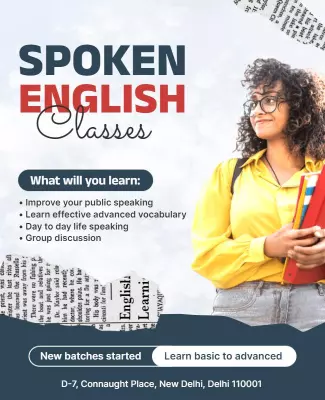
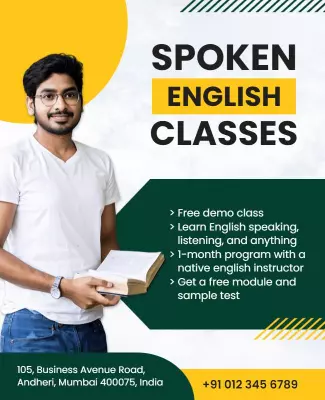
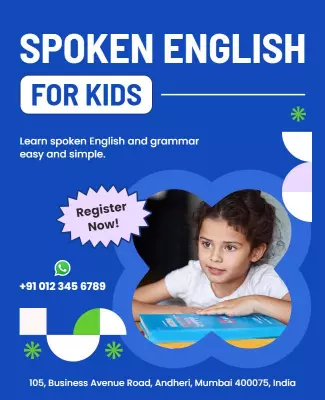
Lead with the skill outcome such as Speak English Fluently or Master Communication Skills, and use bright inviting colors like green, mint, or purple. Include course duration, class format (online or offline), demo class availability, and student age group. For spoken English program posters, adapt modern mint green spoken english summer classes poster template and update the course details and contact information.

Summer batch and admission season posters

Use seasonal themes with bright colors and limited time messaging such as Enroll Now or Seats Filling Fast. Highlight early bird discounts, free demo sessions, and flexible batch options. Include admission process steps and a clear call to action. For admission season posters, customize modern blue education coaching enrollment poster template and add your batch start dates and offer details.

Create Your Coaching Poster Now!

Frequently Asked Questions (FAQs)

A clear coaching poster includes the institute name, subjects offered, target exams or skills, batch timings, faculty qualifications, fee or starting price, and contact details. Add past results or success stats to build trust with parents and students. Include admission process steps such as registration, demo class, and enrollment. Use a bold headline that states the main benefit such as NEET Coaching or Spoken English Classes. Place the most important detail like batch start date or early bird discount at the top where it is seen first.

A4 and A3 sizes work best for coaching posters because they fit standard printers and are easy to display on institute notice boards, school gates, and local shop windows. A4 is ideal for handouts and door-to-door distribution, while A3 works well for hoardings and classroom displays. For digital sharing on WhatsApp, Facebook, and Instagram, use a vertical format at 1080 by 1350 pixels. Keep the headline and key offers in the top third so they are visible in social media feeds and on printed boards.

Blue and white convey trust and professionalism and work well for academic coaching posters. Orange and yellow add energy and motivation suitable for exam prep and summer camps. Green represents growth and success for spoken English and skill programs. Limit your palette to two or three colors for a clean look. Use high contrast combinations for readability such as dark text on light backgrounds. Match the color scheme to your institute branding for consistency across all marketing materials and communication channels.

Write a headline that states the main benefit or course offering in five to eight words. Use phrases like IIT JEE 2026 Batch, Spoken English Fluency Course, or Summer Crash Course Starts June. Include the target audience such as Class 11 and 12 or Working Professionals to attract the right students. Place the headline at the top in bold at least 48pt. Avoid generic headlines like Coaching Classes or Tuition Center since they do not differentiate your institute from competitors in the local market.

Use clean sans-serif fonts like Arial, Helvetica, Calibri, or Poppins for coaching posters since they are readable from a distance and on phone screens. Use 48pt or larger for the headline, 30 to 36pt for subject names and batch details, and 24pt minimum for contact info and fine print. Bold the headline and key offers such as free demo or early bird discount. Avoid script or decorative fonts that reduce readability especially for important details like phone numbers and batch timings.

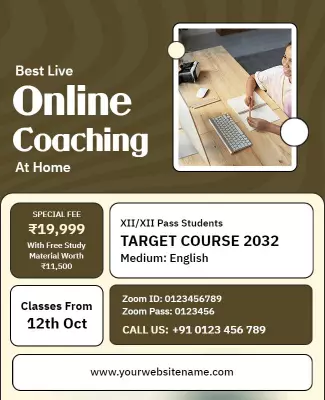
Include the platform name such as Zoom, Google Meet, or your own app in the headline or near the top. List the benefits of online learning such as learn from home, recorded sessions, and flexible timings. Add the registration link or QR code prominently. Include device requirements if any and mention batch size for live classes. Use bright colors and student friendly graphics to make the poster engaging. Keep the layout clean since online class posters are often viewed on small phone screens first.

Including student success results can build trust and encourage enrollments. Add top rank holders, percentage improvements, or number of students passed in a simple readable format. Use specific numbers such as 50+ Selections in 2025 or 95% Pass Rate rather than vague claims. Place results near the headline or as a highlighted badge. Avoid overcrowding with too many names. Verified results build credibility with parents who are comparing multiple coaching options before making a final decision for their children.

Use seasonal themes and colors such as bright summer tones for April to June batches or warm autumn colors for new academic sessions. Add limited time messaging like Early Bird Discount Until 15th or Seats Limited to create urgency. List the batch options, duration, and fee structure clearly. Include a call to action such as Enroll Now or Book Your Free Demo. Distribute posters at least three weeks before the batch start date to give parents enough time to research and decide on enrollment.

Yes, keep the same layout and update the subject name, target exam, batch timings, and faculty details. Swap the color scheme to match different subjects such as blue for science, green for English, or orange for competitive exams. Keep the same font choices and icon placement for consistent institute branding. Save a master template with placeholder sections for subject, batch, fee, and contact details. This approach helps you create new posters for each subject batch in under 10 minutes while keeping a professional look.

A clean vertical layout with clear hierarchy works best for coaching posters. Place the headline and main offer at the top, followed by course highlights or subjects in the middle, and contact details at the bottom. Use bullet points for multiple items such as subjects offered or batch options. Leave enough white space so the poster does not feel crowded. Include a prominent call to action like Call Now or Visit Us Today near the contact section. Keep the most important offer such as free demo or discount in the top half.
Start Designing with AI
Can’t find the perfect design? Create instantly with AI.